A/B testing on the From - mutiple emails/one program | Community
Skip to main content
New Participant
May 4, 2017
Solved

A/B testing on the From - mutiple emails/one program

  • May 4, 2017
  • 1 reply
  • 1594 views

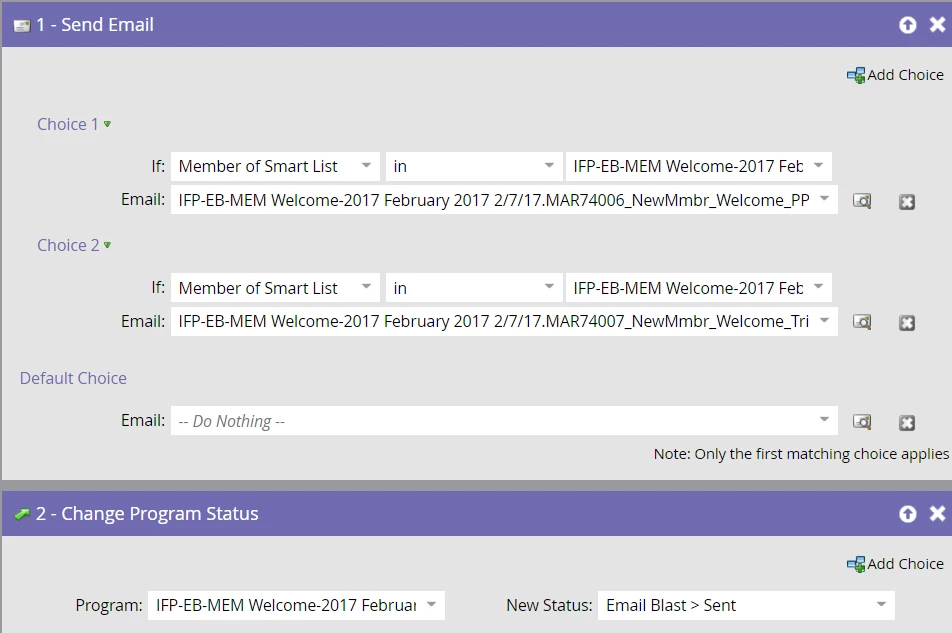
I have a program that has 4 different versions of an email with 4 different distribution lists.  So I'm setting up one default program (vs. separate email programs).  Below is an example of one program that had two different versions.  I want to run A/B testing on the "From" but this is not an "email program".  How do I accomplish this type of A/B testing outside an email program and onto a program like this?  Thank you.

This post is no longer active and is closed to new replies. Need help? Start a new post to ask your question.
Best answer by Veronica_Holme4

Jamie - is this a batch or a triggered campaign? By the setup above I'm thinking it looks like a batch. Champion Challenger as mentioned above could help you if you were using a triggered campaign, but not for batch.

What you are trying to do here is simply not best practice - even if you could do the A/B test in the batch send, it would mess with your reporting horribly. My advice, if you really want to do the A/B testing properly, switch out into separate email program sends as nested programs within this default program, and then if you really want to give them all program statuses in the same program, use smart campaigns to update program statuses in the parent default program.

With the way you are set up above using add choice, you can't even use the old school random sample method, which is really not good enough anyway as it doesn't give the functional or reporting capabilities of the A/B test.

That was all a very long winded way of saying you can't get around breaking this into email programs if you want to use A/B test effectively and get the correct reports.
1 reply

Devraj_Grewal
New Participant
May 4, 2017

Jamie,

I would take a look at the Champion Challenger test method: Product Docs

Veronica_Holme4
Veronica_Holme4Accepted solution
New Participant
May 4, 2017

Jamie - is this a batch or a triggered campaign? By the setup above I'm thinking it looks like a batch. Champion Challenger as mentioned above could help you if you were using a triggered campaign, but not for batch.

What you are trying to do here is simply not best practice - even if you could do the A/B test in the batch send, it would mess with your reporting horribly. My advice, if you really want to do the A/B testing properly, switch out into separate email program sends as nested programs within this default program, and then if you really want to give them all program statuses in the same program, use smart campaigns to update program statuses in the parent default program.

With the way you are set up above using add choice, you can't even use the old school random sample method, which is really not good enough anyway as it doesn't give the functional or reporting capabilities of the A/B test.

That was all a very long winded way of saying you can't get around breaking this into email programs if you want to use A/B test effectively and get the correct reports.

New Participant
May 4, 2017

That's what I thought Veronica - thanks for your help