A/B tests emails in Email reports not matching program reporting | Community
Skip to main content
New Participant
February 21, 2023
Solved

A/B tests emails in Email reports not matching program reporting

  • February 21, 2023
  • 2 replies
  • 1813 views

Hey all,

In the past, I have used email performance reports to report on monthly emails. However recently I have noticed that the numbers are no longer matching.

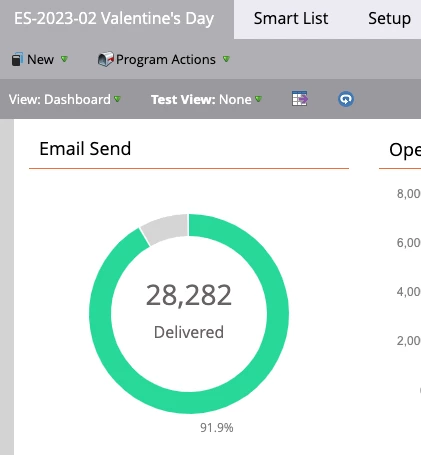
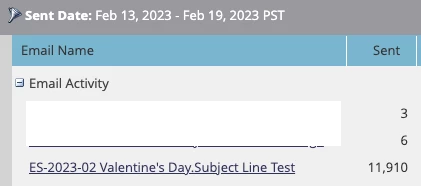
For example, the email reports says we only sent for example 10k emails, while the program shows 30k. 

The email performance report does include AB test in the name of the email.   I should also note that we only subject-tested 10% before a winner was declared, so the numbers don't even match for an AB test. 

The email was sent on Feb 14th.
This post is no longer active and is closed to new replies. Need help? Start a new post to ask your question.
Best answer by ChristianeRo1

It's a little tough to tell exactly what's going on from the screenshots, but there are a few things you can check. 


--In the setup tab for the report, are all the emails you wish to report on selected?

--In the smart list tab for the report, do you have any filters set that would filter out any of your emails?


I'm always hesitant to compare what's in a performance report with what's on the batch email dashboard, as there's no true way to filter in your dashboard the way that you can in a report, so I often see discrepancies between the two. But the above are a good place to start troubleshooting.

2 replies

Darshil_Shah1
Community Manager
February 21, 2023

I second @christianero1's recommendation on ensuring that the report does not have any filters added in the SL/setup tab that may be responsible for lower numbers being shown in the report. If the report's setup is clear, you could also create a smart list to see how many people were sent this email from this email send program to see whether the number matches your expectations or is it way off too. Also, I don't think this discrepancy in number has to do anything with the AB test, the report just needs to reference the correct email. All the engagements/activities are logged for the asset irrespective of whether an AB test was configured or not.


ChristianeRo1Accepted solution
Community Manager
February 21, 2023

It's a little tough to tell exactly what's going on from the screenshots, but there are a few things you can check. 


--In the setup tab for the report, are all the emails you wish to report on selected?

--In the smart list tab for the report, do you have any filters set that would filter out any of your emails?


I'm always hesitant to compare what's in a performance report with what's on the batch email dashboard, as there's no true way to filter in your dashboard the way that you can in a report, so I often see discrepancies between the two. But the above are a good place to start troubleshooting.

user81844Author
New Participant
February 21, 2023

Someone snuck a filter on that report since I last looked at it. Removing it got them to line up, thanks!