
A New Feature to Improve Community Search
Hello Marketing Nation!
I wanted to let you know about an exciting feature we have added to Community recently – searching by user. You can now quickly find user profiles without having to scroll through threads. Searching by users is very easy - simply type the username or full name of the person you’re looking for in the search bar.
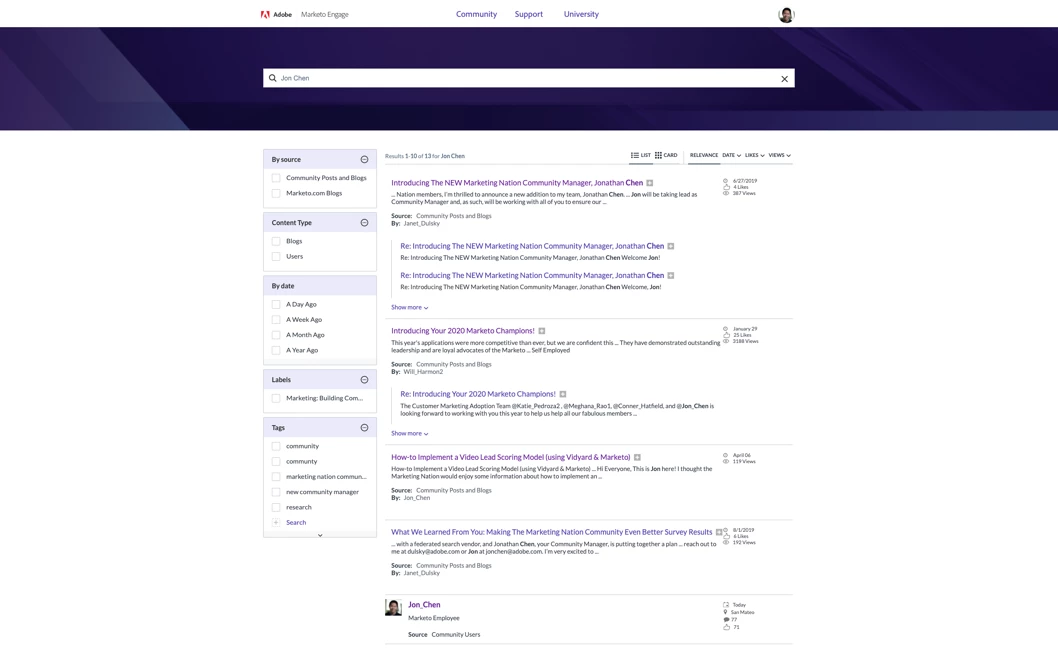
The search results will now show a combination of Community posts and User Profiles ranked by relevancy. Within the profile search result is a variety of user information which can help you identify if this is the right person for whom you’re looking, including: Profile Photo, Profile Description, Last Login Date, Location, Job Title, and Number of Comments, Likes, and Accepted Solutions. Fields that are incomplete will be left blank in the search result.

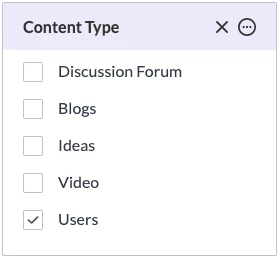
If you would only like to see user profiles relevant to your search result, we have added a “User” filter to let you do just that. Checking this filter in the “Content Type” box on the left-hand side of your search results will adjust your results to only show relevant user profiles. Alternatively, you can check the “Discussion Forum” check box to only see forum type posts, “Blogs” for blog type posts, and so on.
I hope this new feature makes it easier for you to find people in Community. If you have any issues or other feedback, please feel free to reply below or send me a direct message. Thanks everyone and hope you all are staying safe and healthy!