Abort a Smart Campaign | Community
Skip to main content
bjohnson-5
New Participant
February 1, 2023
Solved

Abort a Smart Campaign

  • February 1, 2023
  • 1 reply
  • 3748 views

I found this article: nation.marketo.com/t5/knowledgebase/unable-to-abort-a-triggered-campaign-in-progress/ta-p/253483


It is helpful, but my question is why a deactivated trigger campaign continues to send customers through the flow? I tried to remove campaign members from the flow, but with the campaign being deactivated, it won't allow me to select the campaign. What do I need to do to make sure no more emails are sent from this campaign?


Thank you!

Best answer by Darshil_Shah1

I have a few campaigns that my automation consultant advised me to set up a certain way - they actually advised against engagement programs because they aren't as flexible as smart campaigns. FYI - I've been using Marketo for about 18 months now, so still kind of new.


My typical smart campaign setup is this:
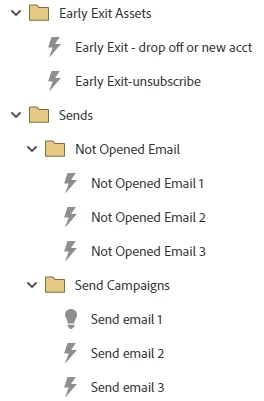
 

Each "Send email" campaign has this smart list and flow:

  • Smart List
    • Member of X list
    • Unsubscribed false
  • Flow
    • Send
    • Wait 2 days
    • Request campaign: Send email X)

The Early Exit campaigns are to remove people that accept whatever offer it is that we are promoting. This is the smart list and flow of those:

  • Smart List
    • Added to list X - if they fill out a form or hit a specific page on our site, they get added to a list
  • Flow
    • Change campaign status to X
    • Remove from list mentioned in first smart list - when they are removed from this list, that is supposed to remove them from the other "Send email X" campaigns. Does that make sense?


If you don't have any wait steps in the Send Email 2/3 trigger campaigns like you have in the Send Email 1 campaign, then you'd need to remove people from the Send Email 1 campaign if they hop off the list. Additionally, to be cautious, I'd also add the Member of List as a filter criteria in the Send Email2 and 3 campaigns, so even though people get requested by the Send Email 1 campaign to flow through the 2/3 campaigns, they don't qualify for them (Send Email2/3 campaigns) if they aren't in the list. Also, instead of setting the send email campaign setup as 1 batch + 2 trigger campaigns, why didn't you set it up as a single campaign with wait steps of 2 days in b/w the 3 send email flow steps?

1 reply

Community Manager
February 1, 2023

Because people are still in a wait step, they will continue to progress through the flow steps. It's just that new members won't be acquired by the campaign trigger. 


Have you tried going to "View Campaign Members" tab, selecting the members you want to stop progressing, and then going to Special > Remove from Flow ... or are you not seeing your campaign there, either?

bjohnson-5
New Participant
February 1, 2023

Hi @christianero1, thank you for the response. I'm not seeing it there either because it's not active.


Another question. If a "Request Campaign" step is in the flow, will the requested campaign pick up? Even if it's not active? Or will the person continue through that flow as well?

Community Manager
February 1, 2023

If the smart campaign that's being requested is active they should proceed through the flow.  

It seems odd that you are not able to see the campaign, even if it's not active. Are you able to go through the steps outlined in this article?