Accessibility issue - Forms validation | Community
Skip to main content
New Participant
October 4, 2022
Solved

Accessibility issue - Forms validation

  • October 4, 2022
  • 1 reply
  • 2281 views

Hi, 
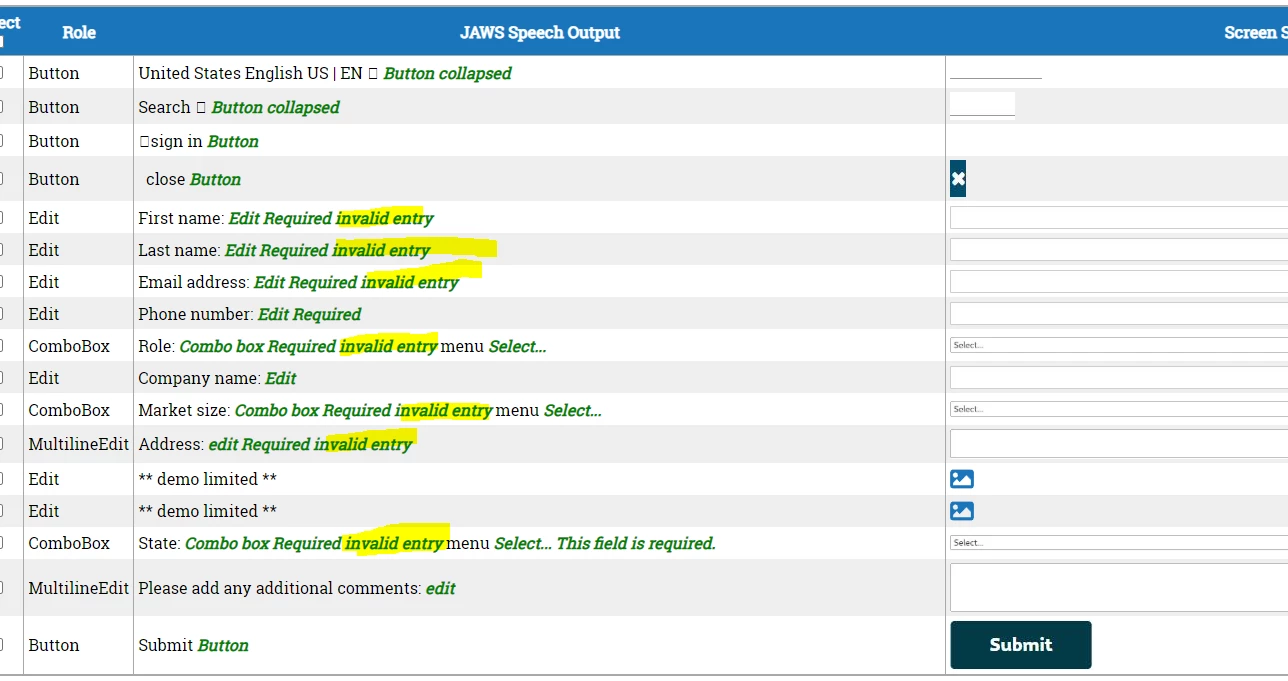
Our accessibility team has highlighted an error they have seen on Marketo forms that we have added for the first time to our CMS (AEM):

"When we check for the screen reader text, all the highlighted text below would get read out. They are the error messages for the form fields and this would be confusing for the end user. They are usually meant to be hidden until form validation occurs on submit. I believe this will impact all the new Marketo forms. Can you aresolve this issue if possible?"

The issues they see are highlighted below. Is this anything I can change myself or is it something that needs updating on the Marketo end?
 

This post is no longer active and is closed to new replies. Need help? Start a new post to ask your question.
Best answer by SanfordWhiteman

They're right. (You might expect me to argue based on precedent but nope!)


The only way to avoid this is to implement your own validation rules using the Forms 2.0 JS API (+ standard JS). Marketo’s validation includes setting aria-invalid on all fields.


1 reply

SanfordWhiteman
SanfordWhitemanAccepted solution
New Participant
October 6, 2022

They're right. (You might expect me to argue based on precedent but nope!)


The only way to avoid this is to implement your own validation rules using the Forms 2.0 JS API (+ standard JS). Marketo’s validation includes setting aria-invalid on all fields.


BenjincAuthor
New Participant
October 6, 2022

Thanks Sandford, I will pass this on to my team.