Active Contacts in Engagement Stream | Community
Skip to main content
August 15, 2016
Solved

Active Contacts in Engagement Stream

  • August 15, 2016
  • 2 replies
  • 3327 views

Hello,

What is the best way to pull how many active leads you have within each stream of an engagement program? I see a variety of reports, but they are primarily focused around sent, received, opened, etc. I just want to know how many active users there are within any one stream of the engagement program.

This post is no longer active and is closed to new replies. Need help? Start a new post to ask your question.
Best answer by Ellie_Boardman-

Hi David,

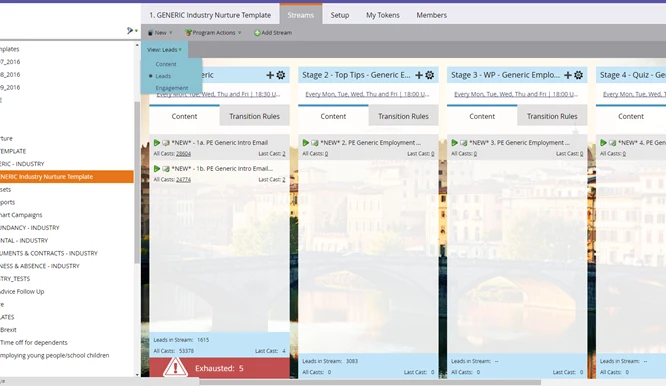
When in the stream, go to the drop down shown below and select leads and that will show you the count of leads in each stream - is that what you were after?
Thanks, Ellie

2 replies

Mark_Dudek1
New Participant
August 15, 2016

It depends what you mean by active.  Leads who exhaust the stream content will be indicated when they have received all available messages in the program.  However, if by active you mean people who have clicked an email, filled out a form, etc..., you'll need to set up a smart list for this - then add to these leads to a list or report you then subscribe to depending on your needs. In my case, I have a smart list that queries leads such as who opened one of the engagement emails, clicked on an email, filled out a form - and then I have variations of this broken down by various segmentations so I figure out what has been effective.

More details on what you mean by "Active" may help us give a better answer.

August 17, 2016

Hey Mark, by "Active" I just means how many people are in that stream at the current moment. Doesn't necessarily mean they would have had to take an action.

Ellie_Boardman-
Ellie_Boardman-Accepted solution
New Participant
August 17, 2016

Hi David,

When in the stream, go to the drop down shown below and select leads and that will show you the count of leads in each stream - is that what you were after?
Thanks, Ellie

Jim_Thao7
New Participant
August 15, 2016

Build a smart list.

Say:

- Member of Engagement Program - Stream is .....

- Clicked Link in Email

- Clicked Link on Webpage

- Filled out Form

- whatever else you'd like to add that you consider makes a lead "active"

November 17, 2016

Can one of the ways to identify Active be as simple as "Reply-to" email? I am setting up an engagement stream that will not use forms, only direct email response to the tokenized sender. I would like to be able to move the responding lead to another stream. Is this possible?

Thanks!