Add a personalized URL to multi-platform save the dates in emails? | Community
Skip to main content
Julia_Campbell
New Participant
May 19, 2020
Question

Add a personalized URL to multi-platform save the dates in emails?

  • May 19, 2020
  • 3 replies
  • 6829 views

Hi folks,


We're using Zoom for our webinars, and it's currently integrated with Marketo. We send out personalized Zoom links to those who register for webinars using the token {{member.webinar url}}. This allows Zoom to recognize which registrants actually attend the event and sync the right Attendees back to the system post event automatically.


The {{member.webinar url}} token works well for the native MKTO .ics save the date and in the body of emails. We're hoping to expand our save the date functionality to be more like what AddEvent offers (e.g. add the event easily and to Apple, Google, Office 365, Outlook, Outlook.com, and Yahoo calendars). Their solution is user friendly and something our marketers could use easily to put together save the date links for various platforms and add to their email builds. For example, here's what their standard setup looks like in the body of an email:

 

The challenge is that MKTO doesn't support nested tokens, and my test with AddEvent to allow personalized URL's in save the dates is failing. I've tried in the location and description areas for events. For example, my test for a Google Calendar save the date appeared as follows when I clicked the AddEvent link from my test email. This wasn't unexpected due to MKTO's token nesting issues, but I'm hoping to find a workaround:
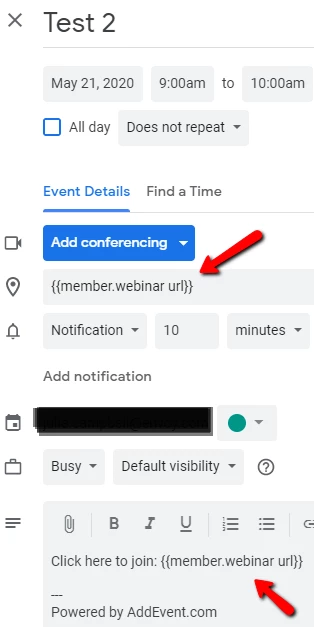


Is there a way to create save the dates for multiple platforms using a token to allow for personalized URL's to an event? Ideally with something user friendly (like AddEvent) that non-techie Marketers can use easily? If there's a way to do this with AddEvent, would love to know the workaround.


Thanks in advance for any insights!

This post is no longer active and is closed to new replies. Need help? Start a new post to ask your question.

3 replies

New Participant
March 15, 2021

I now have this outlined in detail in the Zoom Marketo Integration: Calendar Links post on my blog: "This post will guide you through how to how to set up your Marketo registration confirmation email to include “Add to Calendar” links that contain the unique join URL for each registrant to your Zoom webinar."

Andrew_Cutting1
New Participant
August 12, 2021

Hey Tyron - this is super helpful. Wondering if you or anyone has tried leveraging these same member tokens to add participant IDs to dial-in numbers in confirmation emails, and if so what the best way to format that would be.


Looking at the formatting of their one-touch phone numbers, I'm hoping it could look something like...
+15555555555,,{{my.event ID}},,{{member.registration code}}#


{{my.event ID}} in this case would be the 9 or 10 digit event code, and {{member registration code}} in this case would be the participant ID. Basically trying to give a 1 touch option that associates the individual rather than asking them to add their participant ID after the fact (which no one will do).


Would that kind of approach work? Anyone else try this?


For background, we get complaints from folks (mainly people in the government) saying they can ONLY access webinars over the phone because their "firewall" doesn't allow them to access any zoom event, so they need a dial-in to join discussions (without visuals) at all. I'm sure many of you can relate to feedback like this. In lieu of us re-evaluating platforms to see what "actually works" for government attendees I've been asked to provide dial-ins in confirmation emails, but i only want to do so if i can tie attendance back to a registrant.

SanfordWhiteman
New Participant
August 13, 2021

There’s no particular reason you couldn’t build a tel: URI (<a href="tel:...">) with those tokens in it.


As with other non-universal URI schemes, you’d want to test those links on a variety of devices (including desktops with softphones) so you know what to expect when people say they don’t work as expected.

New Participant
November 18, 2020

@julia_campbell 


I am late to the party here but I have just integrated with Zoom and think the following could help you get the links you are looking for.


I am using the calendar links below in my Marketo email to match those that are sent out in the Zoom confirmation email:

{{my.webinar id}} had to be obtained by copying this value from the Zoom email calendar links

Kim_Wieczner
New Participant
January 4, 2021

@tyronpr Love this workaround. I noticed when implementing, it prompts you to log into your Zoom account. How does this work for webinar attendees who don't already use Zoom? Have you seen any issues there?

Kim Burditt
New Participant
January 6, 2021

@kim_wieczner We used these links in our last webinar and there were no issues. For our next webinar, I'll check to see what the options are when I don't log in with my Zoom account

Darshil_Shah1
Community Manager
May 19, 2020

Hey Julia,


You create a common LP which has the {{member.webinar url}}token and use this as the location for the meeting in the ics as a workaround! More notes on this approach here.


credits : @sanfordwhiteman 


SanfordWhiteman
New Participant
May 20, 2020

Hi Darshil,


That's true and I appreciate the link to my blog post. The redirector method should always be used, IMO, instead of using the {{member.webinar url}} directly.


But that doesn't entirely solve Julia's problem because there's going to be separate redirector URL for each event program, which means it still should be tokenized: it doesn't vary at both program and lead levels the way {{member.webinar url}} does, but it still varies at the program level.


A better overall solution here is to use Agical, which Julia (and you) can read about at https://blog.teknkl.com/tag/agical. Agical links can use Marketo tokens for the Subject, Description, and all other metadata for the event. (And of course it's completely free and anonymous to use btw.)

Darshil_Shah1
Community Manager
May 20, 2020

Sure, Many Thanks @sanfordwhiteman 🙂