Add form check field with hyperlink to privacy policy | Community
Skip to main content
May 11, 2018
Solved

Add form check field with hyperlink to privacy policy

  • May 11, 2018
  • 1 reply
  • 5292 views

To make sure that anyone that enters our system is aware of our GDPR privacy policy, I want to add a form check field that states "I have reviewed the privacy policy and accept the terms." (That was just a random link). Anyone who fills out a form on our website should be required to check this off before submitting a request.

The hyperlink can either open our privacy policy page in a new tab or display our privacy policy in the form of a lightbox.

I have absolutely no idea how to do either of these things and would REALLY appreciate any help I can get.

Thank you!

PS, I like Sanford Whiteman's example in this thread. Too bad he didn't explain how it worked.

This post is no longer active and is closed to new replies. Need help? Start a new post to ask your question.
Best answer by Grégoire_Miche2

Hi Christina,

In fact, you can easily paste some html in a Checkbox (or any other form field type BTW) label on in a checkboxes "display value". So you can have a display value that reads

I have reviewed the <a href="nibusinessinfo.co.uk/content/sample-privacy-policy ">privacy policy</a> and accept the terms

To do this i a label, click the at the right of the field label.

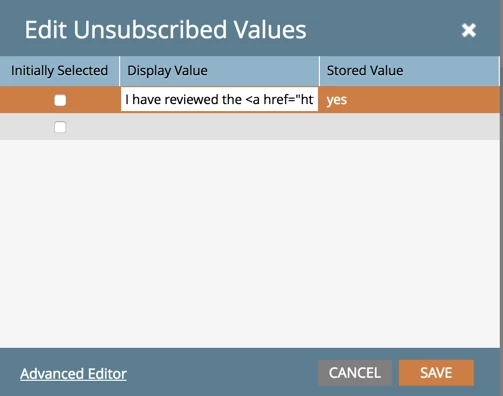
In a checkboxes diplay value simply edit the values and paste the html:

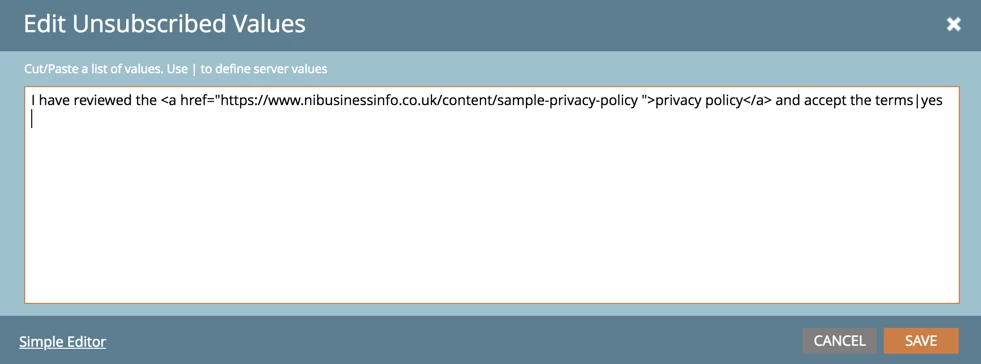
or, in advanced mode

Use the stored value "yes".

-Greg

1 reply

Grégoire_Miche2
Grégoire_Miche2Accepted solution
New Participant
May 11, 2018

Hi Christina,

In fact, you can easily paste some html in a Checkbox (or any other form field type BTW) label on in a checkboxes "display value". So you can have a display value that reads

I have reviewed the <a href="nibusinessinfo.co.uk/content/sample-privacy-policy ">privacy policy</a> and accept the terms

To do this i a label, click the at the right of the field label.

In a checkboxes diplay value simply edit the values and paste the html:

or, in advanced mode

Use the stored value "yes".

-Greg

May 13, 2018

Thank you Gregoire, this solved my problem. Thanks so much!!!

Grégoire_Miche2
New Participant
May 13, 2018

You are welcome