
Add Snippets to Segments in an Email | Community
Skip to main content
Sean_Hardaker
New Participant
July 7, 2016
Solved

Add Snippets to Segments in an Email

  • July 7, 2016
  • 4 replies
  • 6199 views

Is it possible to use a snippet when segmenting your audience in an email?
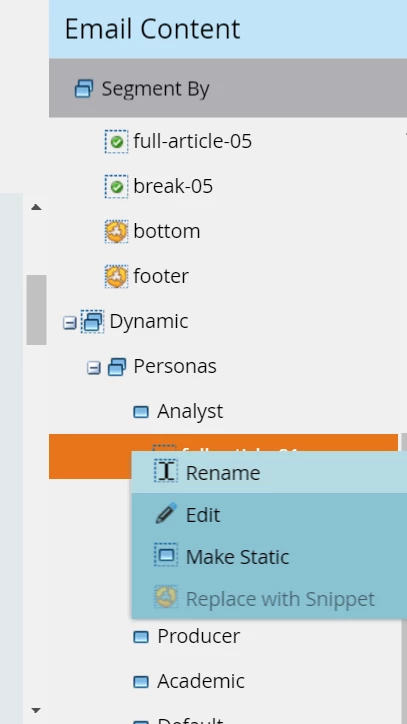
The only way I can see to do it is save my content as rich tokens and just add the token in the email editor for the desired segment.

This works but makes the email design less clear and requires a test email to see it with all the content.

I'm using the old email editor still.

thanks in advance

Message was edited by: Sean Hardaker - I added the screenshot

This post is no longer active and is closed to new replies. Need help? Start a new post to ask your question.
Best answer by Julz_James

Hi Sean,

You CANNOT add a snippet within a segmentation.  You either have to Segment the snippet when you create it, or do your Option A.

You can't do a dynamic segmentation and then add a snippet to that segmentation. Its not possible.

Thanks

Juli

4 replies

Sean_Hardaker
New Participant
July 8, 2016

Inside the email creation tool, you can see that the snippet option is grayed out.

Julz_JamesAccepted solution
New Participant
July 12, 2016

Hi Sean,

You CANNOT add a snippet within a segmentation.  You either have to Segment the snippet when you create it, or do your Option A.

You can't do a dynamic segmentation and then add a snippet to that segmentation. Its not possible.

Thanks

Juli

February 16, 2017

While Juli is partially correct in this answer, you can still use a snippet in Dynamic segmentation.

  1. Have your editable region start in the static area
  2. You MUST apply the same segmentation to your snippet as you are using in your email
  3. Once your snippet is segmented and approved, right click the editable region and select "Replace with snippet"

Your snippet will now filter into all of your dynamic segments in your email. I use this on a daily basis and it will work. Biggest key is that your segmentation MUST be the same on both sides, the snippet and the email.

I hope this is not too late and you can implement this into your process.

Thanks,

Trent

Chris_Saporito
New Participant
July 7, 2016

To add a Snippet you can right click on the section that you would like to dynamically change.

Once you pick your pre-made and approved snippet you can click the preview button and it will allow you to view the email from the different segmentation options. It's up in the top right.

Sean_Hardaker
New Participant
July 8, 2016

you are applying the segment to a static element in the email, you have not applied any segmentation in your example.

Please clarify and see my screenshot below.

thanks

Sean

Duane_Kennerson
New Participant
July 7, 2016

I believe you can do segmentation right in the snippet itself. Unless I'm missing your question as well...

Sean_Hardaker
New Participant
July 8, 2016

when you segment there you are able to include different html depending on the segment. However, if you wish to reuse that html elsewhere you cannot unless it is stored globally, in a snippet, for example.

thanks

Sean

Jim_Thao7
New Participant
July 7, 2016

Snippets are definitely designed to use with segmentations in order to produce dynamic content.

I feel like there is something that I may be missing the question.  Anything that you're trying to accomplish specifically?

Sean_Hardaker
New Participant
July 8, 2016

Please see my screenshot below.  Could you describe how you attribute a snippet to a dynamic segment?

thanks

Sean

Jim_Thao7
New Participant
July 11, 2016

You won't be able to use "Segment By" AND "Replace with Snippet".  They are two in the same.  You will need to choose either "Segment By" or "Replace with Snippet" as both serve the same purpose.

The screenshot you provided is already using "Segment By" to serve up dynamic content therefore you won't be able to use "Replace with Snippet".  You will need to make this section static again, delete the dynamic Segment to alleviate any confusion and then start from the beginning again using "Replace with Snippet" instead.