Add to Salesforce Campaign Problem | Community
Skip to main content
January 30, 2018
Solved

Add to Salesforce Campaign Problem

  • January 30, 2018
  • 2 replies
  • 3437 views

Hi all,

I have a lot of individual resources on our website, sitting behind Marketo forms. Ideally we want each of these assets to have their own Salesforce Campaign - so 1 form per 1 Salesforce campaign. So each form is set up to have it's own hidden Campaign ID (from Salesforce) and we use the Marketo flow step - 'Add to SFDC Campaign' - so new lead comes in from the website- if Campaign ID is X...Campaign is Y, Status = 'Responded'. The issue is that there are now hundreds of these assets, so hundreds of forms and campaigns have been created and so hundreds of flow steps - one per campaign - which is starting to clog up the activity logs. The issue is that a generic Salesforce campaign doesn't really tell us which assets are being associated with Contacts on Opportunities. The Salesforce Campaign reporting seems to give Marketing what they need very easily, so I need a solution that keeps everyone happy...any ideas are welcome>>>

This post is no longer active and is closed to new replies. Need help? Start a new post to ask your question.
Best answer by Grégoire_Miche2

Hi Michael,

You can use the Add to "SFDC campaign" and pass the campaign ID as a parameter instead of the campaign name. So you do not need to convert the id into a campaign name.

In your form, you will also need an "SFDC Campaign Status" hidden field that you can populate with the value you need (use default value or a URL parameter for this).

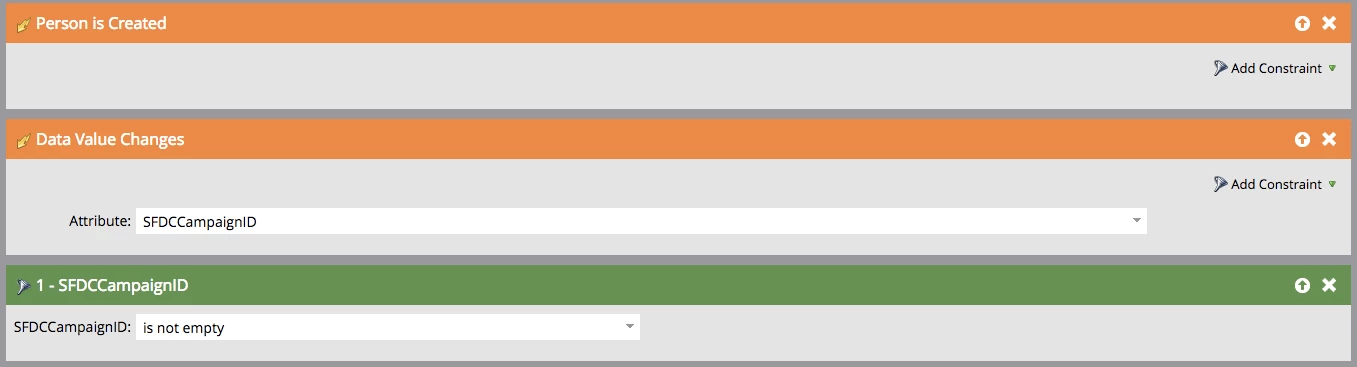
Then use  smart campaign configured like this :

  • Smart list:
  • Flow:
  • Qualification rules : every time

Yo simply need to make sure that the form captures the correct ID and campaign status through hidden fields.

Hope this helps,

Greg

2 replies

Grégoire_Miche2
Grégoire_Miche2Accepted solution
New Participant
February 1, 2018

Hi Michael,

You can use the Add to "SFDC campaign" and pass the campaign ID as a parameter instead of the campaign name. So you do not need to convert the id into a campaign name.

In your form, you will also need an "SFDC Campaign Status" hidden field that you can populate with the value you need (use default value or a URL parameter for this).

Then use  smart campaign configured like this :

  • Smart list:
  • Flow:
  • Qualification rules : every time

Yo simply need to make sure that the form captures the correct ID and campaign status through hidden fields.

Hope this helps,

Greg

February 8, 2018

Genius! Thank you...

One question - would you reset those 2 values to NULL on the Lead record at the end of the flow step for completeness, or is that not necessary?

Grégoire_Miche2
New Participant
February 8, 2018

Hi Michael,

Yes, it's better to reset them to null immediately after.

-Greg

Gerard_Donnell4
New Participant
January 30, 2018

Have you thought about using MSI Interesting moments to fill in gaps in what people are doing.  You can use tags to dynamically populate these with webpages etc so you would only need to create one or two smart campaigns to take care of everything.

Using Interesting Moments - Marketo Docs - Product Documentation

January 30, 2018

Hi there,

yes, we do this as well - so this is already covered as far as SI is concerned. The good thing about the Salesforce campaigns is that it shows, in one place, how many Leads are associated with the campaign, how many have been converted, how many are associated to Opportunities and how many of these are Won - so from Marketing's point of view this is exactly what they need to see which assets are helping - they then use hierarchies in Salesforce campaigns - i.e for Blogs/Infographics etc so again they can see at a higher level what assets are helping with conversions. But Marketo support says that you can only connect 1 form with 1 campaign and 1 flow step...