Adding new lead data in a field without erasing the existing one | Community
Skip to main content
New Participant
March 15, 2023
Solved

Adding new lead data in a field without erasing the existing one

  • March 15, 2023
  • 1 reply
  • 1440 views

Hi guys, 


I am trying to add a field that keeps historic information and can be exported in a CSV when I export it from the contact/lead section, so it has to be Lead Custom Field.


Is there a way to set up the Data Change trigger or the flow like something "{{lead.CustomField}} + {{lead.New.CustomField}} to keep old data but add new one? 


Thank you for your help.
 

This post is no longer active and is closed to new replies. Need help? Start a new post to ask your question.
Best answer by Darshil_Shah1

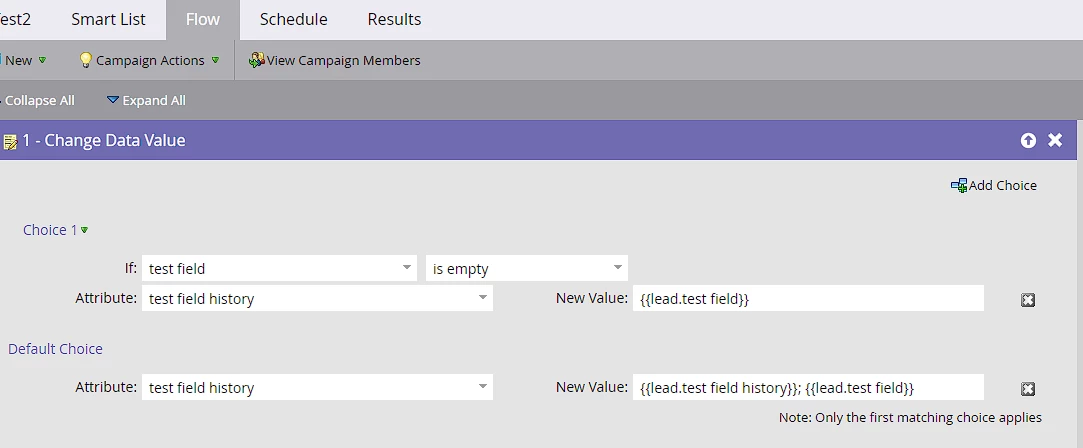
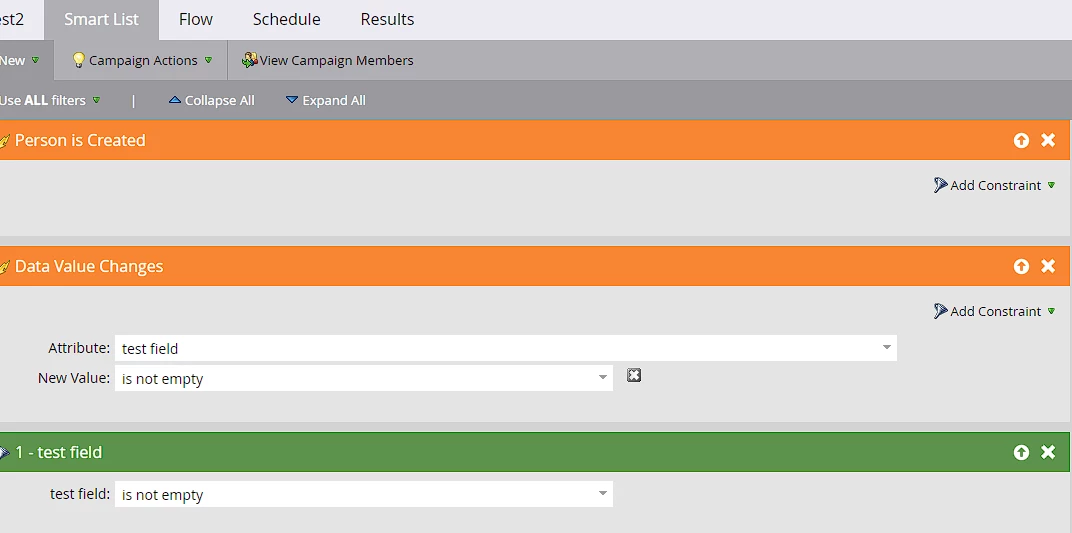
Yes, you can create a custom History field in which you append the value when a value in the original field changes (or a new person is created with a non-empty value in the field). Check out the below campaign setup:

Smart List:

Flow:

Set the campaign qualification rules to allow people to flow through the campaign multiple times. I hope this answers your question.


1 reply

Darshil_Shah1
Darshil_Shah1Accepted solution
Community Manager
March 15, 2023

Yes, you can create a custom History field in which you append the value when a value in the original field changes (or a new person is created with a non-empty value in the field). Check out the below campaign setup:

Smart List:

Flow:

Set the campaign qualification rules to allow people to flow through the campaign multiple times. I hope this answers your question.


New Participant
March 15, 2023

Thank you so much, this is what I was looking for! Thank you also for the detailed answer.