Admin - Salesforce Sync Activities | Community
Skip to main content
New Participant
October 11, 2017
Solved

Admin - Salesforce Sync Activities

  • October 11, 2017
  • 2 replies
  • 3437 views

All,

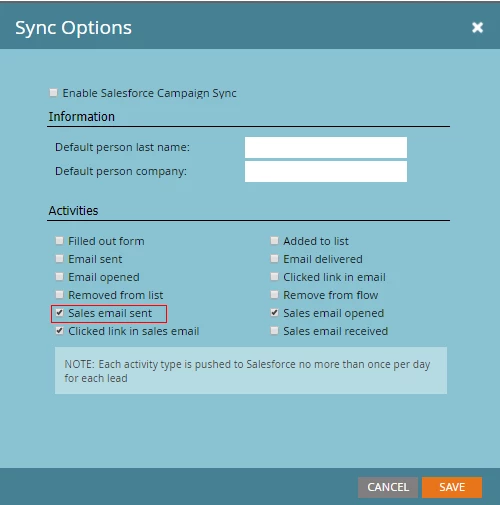
Use Case 2 - If in Admin clicks the radio button "Sales Sent Email" and Contact A receives 5 e-mails from MSI we understand and have tested that only one task is synced as noted on the screen snag.
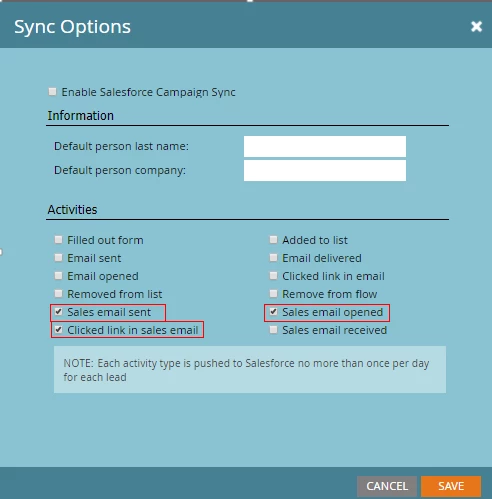
Use Case 2 - Contact B is sent a sales e-mail and Contact B opens the e-mails and clicks 2 links. With the configuration below will we see one task for "sales sent email", one task for "sales opened email", and one task for "clicked link in sales email" or will we see two tasks for "clicks link in sales email"?
Thank you,

Kristy

This post is no longer active and is closed to new replies. Need help? Start a new post to ask your question.
Best answer by Grégoire_Miche2

Hi Kristy,

If the perso click on the 2 links on the same day, only 1 task will be created.

Be aware with these "task creation" options : you end up creating such an overload in you salesforce tasks that they become useless for their regular purpose that is for sales to manage their work. Unless you need them for reporting, use some interesting moments that show up in MSI instead.

-Greg

2 replies

Josh_Hill13
New Participant
October 11, 2017

I believe that is true if those actions occur in a standard 24 hour day.

test it!

New Participant
October 12, 2017

Thanks Josh! We are testing now. I try to take every angle to see if our instance reacts as expected, salesforce acts like it should, etc. We are testing now and with all 3 activities on in production we are only seeing the 'sales sent email" task. A case it is

I like to get feedback from others users to see what they've experienced or any other "gotcha" things.

Grégoire_Miche2
Grégoire_Miche2Accepted solution
New Participant
October 11, 2017

Hi Kristy,

If the perso click on the 2 links on the same day, only 1 task will be created.

Be aware with these "task creation" options : you end up creating such an overload in you salesforce tasks that they become useless for their regular purpose that is for sales to manage their work. Unless you need them for reporting, use some interesting moments that show up in MSI instead.

-Greg

New Participant
October 12, 2017

Greg,

We are using it soley for reporting. We just needed something for leadership in Salesforce to get them behind MSI.

Kristy