Advanced Filter Error | Community
Skip to main content
Yun_Bai1
New Participant
January 5, 2018
Solved

Advanced Filter Error

  • January 5, 2018
  • 2 replies
  • 2466 views

Hello,

I created a smart list and have the logic as below, by using Advanced filters 1 and (2 or 3 or 4). However, after I go back to my smart list, it shows me "not saved, invalid expression". I tried 1 and (2 or (3 or 4)), but Marketo still throw out the error. Can anyone kindly share with me why I got this error and how should I modify the advanced filter to make it run properly?
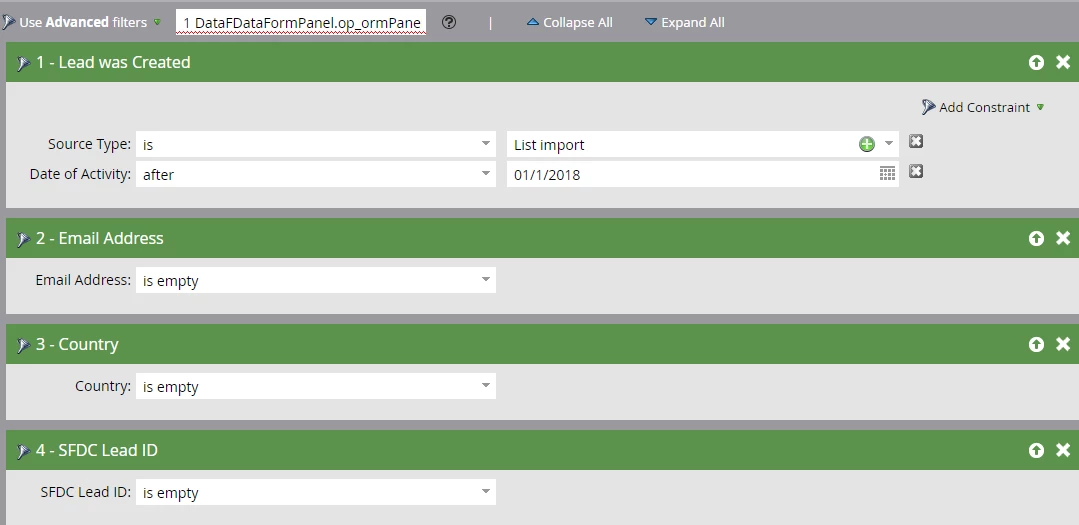
Thank you,

Becky

Best answer by Chris_Saporito

You can read up on the issue here: Support

Smart List Advanced Logic Display Issue

We have identified a display issue when using Advanced Logic for Smart Lists. The filter logic displayed looks like code instead of the actual filter logic. This does not affect the functionality of the Smart List and the logic can be updated as normal. We are working to resolve this and will provide an update once it is fixed.

Support is aware of the issue!

2 replies

keithnyberg
New Participant
January 5, 2018

Hey Becky,

I tested this and it appears Marketo is correct that your flows should not be affected. What I mean by this, is that I was able to update the advanced logic and click out on the screen anywhere else. This prompted the auto-save (see image below).

Once you see that it has been saved, go directly to your schedule and run it.

If you refresh your smart list page, the code shows in the advanced logic and makes it invalid again.

Hope this workaround helps until Marketo gets the issue resolved. Not being able to edit advanced logic would be a seriously major issue and while this is annoying, can still be worked around.

Sincerely,

Keith Nyberg

Yun_Bai1
Yun_Bai1Author
New Participant
January 5, 2018

Thank you Keith. Yes, this happened to me after I refreshed the smart list page or get out the smart list and then go back in.

Chris_Saporito
Chris_SaporitoAccepted solution
New Participant
January 5, 2018

You can read up on the issue here: Support

Smart List Advanced Logic Display Issue

We have identified a display issue when using Advanced Logic for Smart Lists. The filter logic displayed looks like code instead of the actual filter logic. This does not affect the functionality of the Smart List and the logic can be updated as normal. We are working to resolve this and will provide an update once it is fixed.

Support is aware of the issue!

Yun_Bai1
Yun_Bai1Author
New Participant
January 5, 2018

Good to know. Thanks you Chirs.