Alert e-mails not always received properly | Community
Skip to main content
August 18, 2016
Solved

Alert e-mails not always received properly

  • August 18, 2016
  • 1 reply
  • 3256 views

Dear all,

In the smart campaign that handles a filled in form and sends a confirmation e-mail to the lead, i've included an alert to me and my colleagues.

The purpose of this alert is ofcourse that we immediately know it when a new lead is created.

The only problem is, these alerts don't always arrive properly. I've constructed like this:
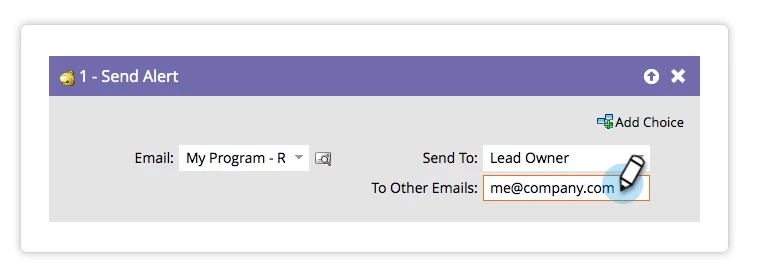
And in the 'To other e-mails' i've stated: me@example.com colleague1@example.com colleague2@example.com

We're eight in total and that this point three of us seem to receiving the e-mails, but the other five are going wrong.

Is there perhaps a different, better way to manage these alerts?

Thanks in advance!

This post is no longer active and is closed to new replies. Need help? Start a new post to ask your question.
Best answer by Frank_Breen2

In the "To Other Emails" box, are you separating each email address with a comma or semi-colon?

me@example.com, colleague1@example.com, colleague2@example.com

me@example.com; colleague1@example.com; colleague2@example.com

You'll need this to send to multiple email addresses.

1 reply

Frank_Breen2
Frank_Breen2Accepted solution
New Participant
August 18, 2016

In the "To Other Emails" box, are you separating each email address with a comma or semi-colon?

me@example.com, colleague1@example.com, colleague2@example.com

me@example.com; colleague1@example.com; colleague2@example.com

You'll need this to send to multiple email addresses.

August 18, 2016

I did that before, but then it also was not flawless. Will try again, maybe now it will work better.

Will let you know

Frank_Breen2
New Participant
August 18, 2016

Also in the Results Tab, if you click on the Send Alert ID, it will give you details of the send:

This should indicate who the Alert went to.