Anchor links in email don't function in email client | Community
Skip to main content
Dan_Stevens_
New Participant
March 3, 2016
Solved

Anchor links in email don't function in email client

  • March 3, 2016
  • 2 replies
  • 16255 views

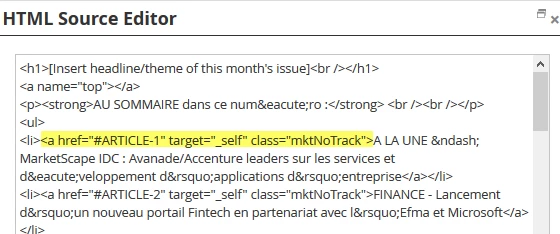
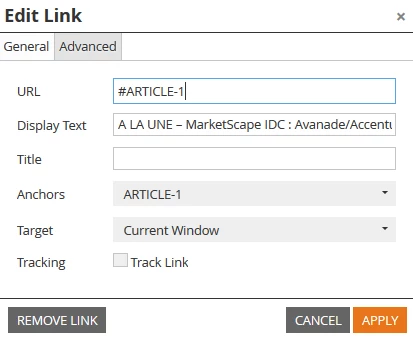
One of our marketers in France created a newsletter with anchor links at the top.  Attached is the HTML.  When viewing in a browser, everything works fine.  But not when viewing in an email client (Outlook or Gmail).  Each link is configured as not trackable.  When looking at the source code in Outlook, the links are indeed not Marketo tracking links.  Any thoughts?
Best answer by Justin_Cooperm2

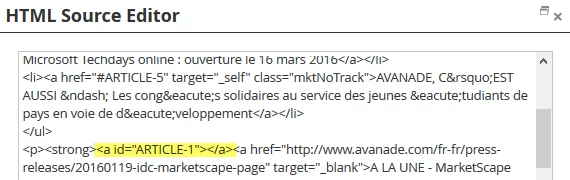
make it <a name="ARTICLE-1"></a> and it will work

2 replies

Justin_Cooperm2
New Participant
March 3, 2016

Also check this page out: Anchor Link functionality across email clients | Campaign Monitor

Dan_Stevens_
New Participant
March 3, 2016

Thanks Justin.  I've referred to CM's compatibility checker in the past - but it's getting pretty dated.  As for the proper link construct, this is how Marketo's editor coded it.  Should we raise an bug report; or really not worthwhile since a new editor is upon us?

Justin_Cooperm2
New Participant
March 3, 2016

It's not really a bug. It's more that you are experiencing the common "why are all these damn email clients different" predicament...

http://stackoverflow.com/questions/484719/html-anchors-with-name-or-id

In HTML 5, <a name="foo"></a> is not even valid. So if we did that, then we would not be future-proofing our editors. In addition, the text editor anchor logic is shared between landing pages and email, so we want to try to align to most recent standards. Of course, this doesn't mean that old/weird email clients will support the HTML5-compliant approach (as you see with Gmail). Heck, Gmail doesn't even support media queries or CSS in the <head> section of an email yet.

Perhaps we can consider adding <a id="foo" name="foo"></a> as a short-term "fix" until the clients get more modern...

Justin_Cooperm2
Justin_Cooperm2Accepted solution
New Participant
March 3, 2016

make it <a name="ARTICLE-1"></a> and it will work