
Anyone use the Hoosh Marketing Excel webhook before? | Community
Skip to main content
Nathaniel_Kobza
New Participant
October 2, 2018
Solved

Anyone use the Hoosh Marketing Excel webhook before?

  • October 2, 2018
  • 1 reply
  • 6052 views

Hey everyone,

I was wondering if any of y'all have set up and used the Hoosh Marketing Excel webhook before? More specifically, has anyone used it to the capacity of calculating scores from various score fields?

In our sandbox instance, we followed the directions to the 'T' in the documentation Hoosh has provided: hooshmarketing.com/internal/excel-webhook/.

While we have gotten it to successfully calculate the formula and come up with the correct result (shown in the activity log), we have not be able to figure out why it is not populating the designated score field.

Image below is showing the activity log details when the webhook is called:
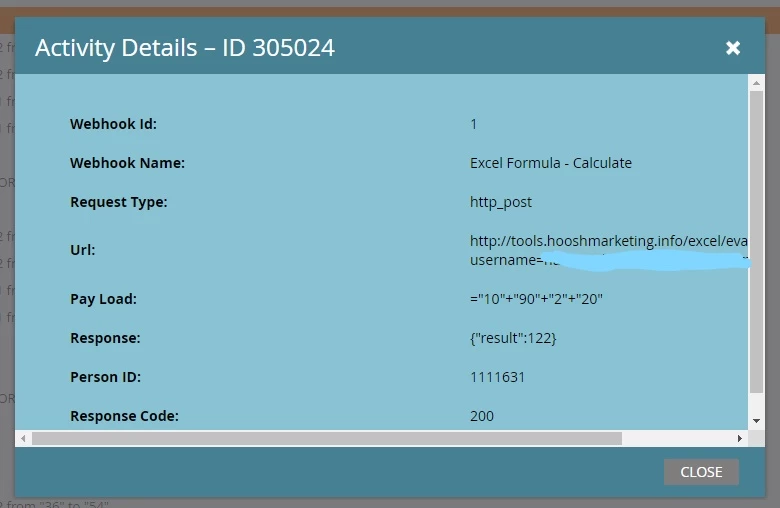
Image below is the setup for the webhook:
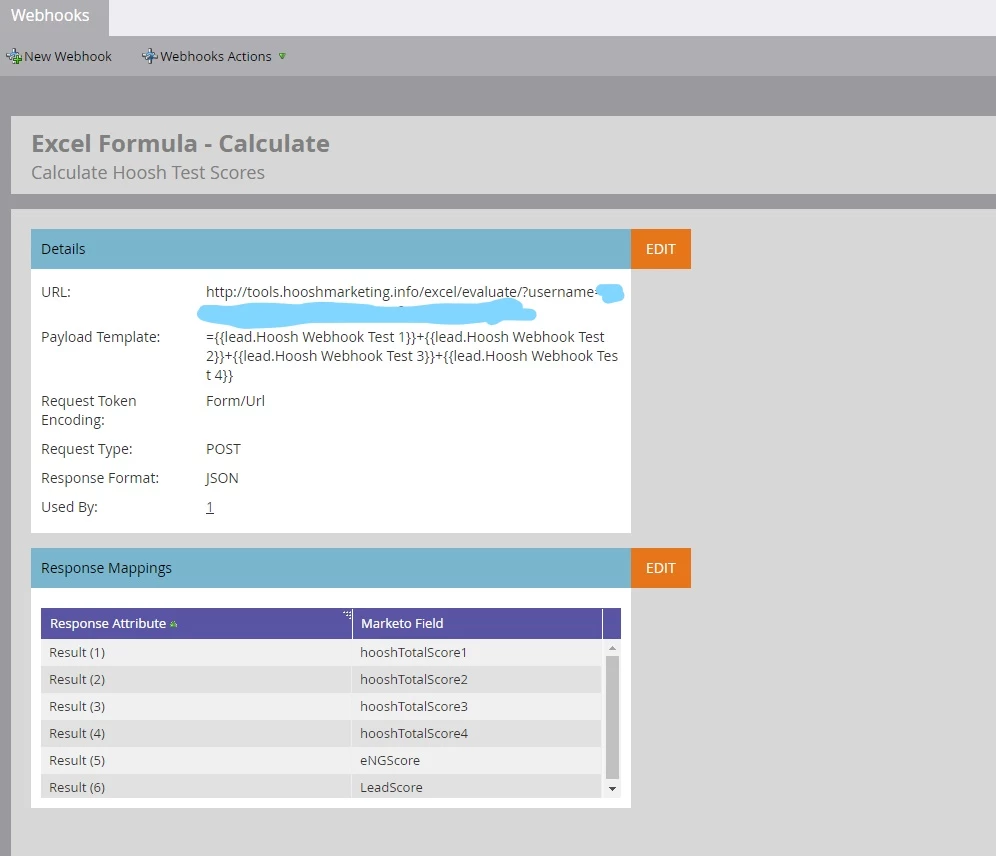
We have tried using different field types for it to calculate the score off of, and we have tried different field types for the score to be mapped too. And we have already tested it with just calculating two fields and going to the default Lead Score/Person Score field.

Any help would be much appreciated!

Best answer by SanfordWhiteman

That JSON response has single, case-sensitive, lowercase property

  result

That property should be in the left-hand-side of your Response Mapping.

1 reply

SanfordWhiteman
SanfordWhitemanAccepted solution
New Participant
October 2, 2018

That JSON response has single, case-sensitive, lowercase property

  result

That property should be in the left-hand-side of your Response Mapping.

Nathaniel_Kobza
New Participant
October 2, 2018

THANK YOU!

That literally did the trick.

Andrew_Slutzky1
New Participant
April 13, 2019

Hello @Nathaniel Kobza​ and @Sanford Whiteman​,

I'm actually running into some issues myself here with this Marketo Excel Webhook integration.

Any feedback would be awesome:)

QUESTIONS:

1. Do you have to be a Hoosh Marketing Client in order to use their Excel webhook?

Not sure if the username and password in the Webhook is from Marketo or Hoosh.

It is my understanding that this tool is free and doesn't have any limitations (i.e., API calls, webhook fields) etc...

2. Any ideas why I'm not returning any results?

I've followed all of the directions in your documentation.

The inability of Marketo to natively add formula fields together is causing us major issues.

We are trying to add Demographic score + Behavior score + Firmographic score = Person Score.

Demographic + Behavior + Firmographic all get stamped by MKTO.

The addition lives inside of SFDC and SFDC stamps Person Score on the Lead and on the Contact via two Workflow Rules.

Both Workflow Rules fire only if any of the fields ISCHANGED().

SFDC support said ISCHANGED() only fires on field updates that come from SFDC though.

Thus, they haven't been stamping. I think your Webhook can solve this if everything lives in MKTO.

Thanks!

All the best,

Andrew