Auto Submit Marketo Form if a person visit again | Community
Skip to main content
September 18, 2018
Solved

Auto Submit Marketo Form if a person visit again

  • September 18, 2018
  • 1 reply
  • 3816 views

Hi there,

I am using a form on many landing pages and want to auto submit the form in case it's pre-filled with information. I tried it using below code but it's not working. Any idea what i am missing?

<script>

MktoForms2.loadForm("//app-sj08.marketo.com", "897-EWH-515", 2230);

MktoForms2.whenReady(function(form) {

form.submit();

});

</script>

Thanks in advance!
This post is no longer active and is closed to new replies. Need help? Start a new post to ask your question.
Best answer by SanfordWhiteman

I didn't mean have a custom onSuccess that redirects immediately to a Thank You URL. I mean an onSuccess that stays on the page, otherwise the user experience is... questionable. (Like an auto-refresh after N seconds more than a redirect.)

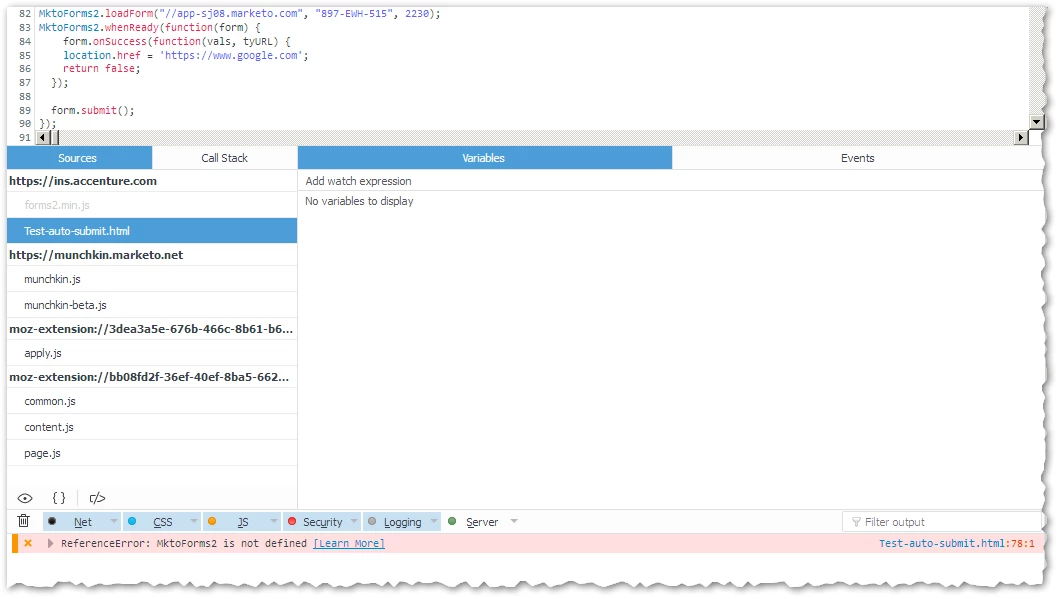
The functional problem with your form is that you're calling MktoForms2.whenReady before the forms library (forms2.min.js) is loaded. You can see the error in your F12 Console:

Move your custom behaviors code just inside the closing </body> tag on Marketo LPs.

1 reply

SanfordWhiteman
New Participant
September 18, 2018

The way you've written it (and please go back and highlight your code as JavaScript using the Advanced Editor's syntax highlighter) is going to be confusing for the end user because (a) they'll get a submit error as soon as they hit the page if they haven't filled out the form and (b) the page will, unless you have a custom onSuccess handler, redirect somewhat clumsily if they have filled out the form.

But other than those factors there's nothing wrong with the code. Please provide your URL so we can see why it's not working.

September 19, 2018

Thanks for your response. I have added the custom onSuccess handler as you suggested but it's still not working.

Here is the link for my page:

ins.accenture.com/Test-auto-submit.html

and the revised code is

MktoForms2.loadForm("//app-sj08.marketo.com", "897-EWH-515", 2230);

MktoForms2.whenReady(function(form) { 

    form.onSuccess(function(vals, tyURL) { 

    location.href = 'https://www.google.com'; 

    return false; 

  }); 


  form.submit(); 

});

SanfordWhiteman
SanfordWhitemanAccepted solution
New Participant
September 19, 2018

I didn't mean have a custom onSuccess that redirects immediately to a Thank You URL. I mean an onSuccess that stays on the page, otherwise the user experience is... questionable. (Like an auto-refresh after N seconds more than a redirect.)

The functional problem with your form is that you're calling MktoForms2.whenReady before the forms library (forms2.min.js) is loaded. You can see the error in your F12 Console:

Move your custom behaviors code just inside the closing </body> tag on Marketo LPs.