Basic CSS Question for Marketo Form | Community
Skip to main content
New Participant
August 3, 2022
Solved

Basic CSS Question for Marketo Form

  • August 3, 2022
  • 2 replies
  • 3854 views

I am working in a Marketo form and selected font in the form settings for each of the labels. The labels are showing up as expected.

However,  I am also using Field Sets in the form, and the field set labels are using an entirely differet font and size than the rest of the labels. The differing font and sizes looks like an error and I can't control that in form settings.


Marketo support informed me that to change the Field Set Label font, I need to edit the CSS code. I do not have much experience with code and dont know what code I would need to edit the syling on field sets. Does anyone have any basic code that could be used to control field set label font and size?


See an example below. Product 1 (the field set label) is a different font than the rest of the form labels and that is what I am trying to fix.
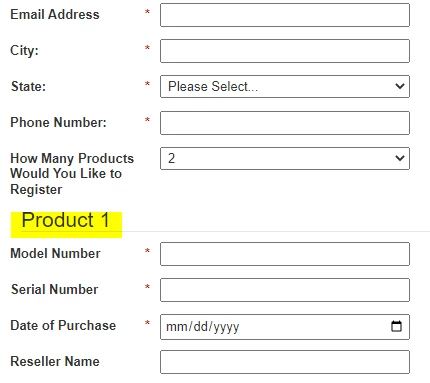


Thank you so much in advance. I appreciate any tips!


Steve

This post is no longer active and is closed to new replies. Need help? Start a new post to ask your question.
Best answer by SanfordWhiteman

Your Legend element is being styled in bootstrap.css:

legend { display: block; width: 100%; padding: 0; margin-bottom: 20px; font-size: 21px; line-height: inherit; color: #333; border: 0; border-bottom: 1px solid #e5e5e5; }

P.S. You can see this easily by Inspect-ing the element.

2 replies

Darshil_Shah1
Community Manager
August 3, 2022

To Sandy's point, you should definitely share the LP URL with the form on it to get assistance with the CSS.


Additionally, FYR, if you update the font type, text size, etc. in the form setting, by default it gets applied to the field set label as well (unless of course if there's custom styling added on thr page to override them). See below snapshot, the form settings are by default applied to the fields and fieldset labels.


New Participant
August 3, 2022

Thanks Darshil! For some reason, despite selecting the font and size in form settings, the field set label is not aligning.


I will send you a link to the page I have in chat.


Thank you for your reply!


Steve

SanfordWhiteman
New Participant
August 3, 2022

You'd need to link to your page for someone to give suggestions about how to fix your CSS.

New Participant
August 3, 2022

Thank you Sanford! I appreciate your reply. I will send you a link to the page in chat. As always, I appreciate any time and insight you may be able to provide!


Steve

SanfordWhiteman
SanfordWhitemanAccepted solution
New Participant
August 3, 2022

Your Legend element is being styled in bootstrap.css:

legend { display: block; width: 100%; padding: 0; margin-bottom: 20px; font-size: 21px; line-height: inherit; color: #333; border: 0; border-bottom: 1px solid #e5e5e5; }

P.S. You can see this easily by Inspect-ing the element.