
Best way to have two workspaces share the same database? | Community
Skip to main content
Danielle_Wong
Community Manager
February 5, 2018
Solved

Best way to have two workspaces share the same database?

  • February 5, 2018
  • 1 reply
  • 2296 views

Anyone have an instance set up like this?

Thanks!

This post is no longer active and is closed to new replies. Need help? Start a new post to ask your question.
Best answer by

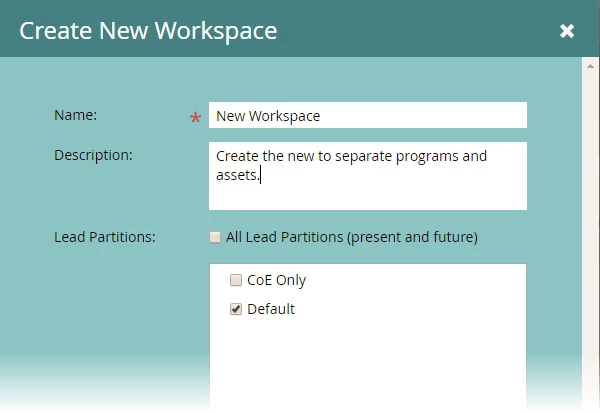
Hi.  You can create multiple workspaces that use the same database.  Primarily the benefit is to limit the access to programs and assets.  I've done this in the past where we had one global lead database, but different business teams with limited access to their resources.  You can then use the roles (or create new ones) that will restrict the types of things that can be done.  We did this so we would have one view of the customer and permissions, but the customer may work with multiple business units.

First create the new workspace and make sure that it has access to the same database...
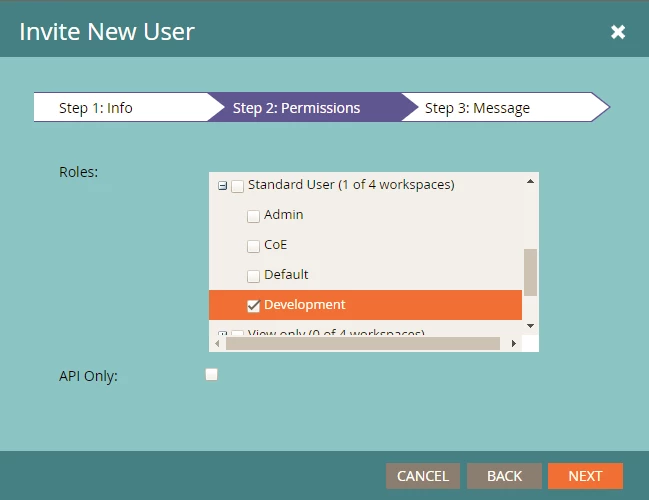
Second, create or edit the user and select the only the workspace permission(s) that you want them to have.
Does this answer your question?

1 reply

Josh_Hill13
New Participant
February 5, 2018

Can you describe more of what you want to do?

Workspaces can be pointed at any # of partitions.

Danielle_Wong
Community Manager
February 5, 2018

We want to create a new workspace where the users will only have limited access to pull lists/smart lists and create new campaigns (emails), and access to some email templates.

Accepted solution
February 5, 2018

Hi.  You can create multiple workspaces that use the same database.  Primarily the benefit is to limit the access to programs and assets.  I've done this in the past where we had one global lead database, but different business teams with limited access to their resources.  You can then use the roles (or create new ones) that will restrict the types of things that can be done.  We did this so we would have one view of the customer and permissions, but the customer may work with multiple business units.

First create the new workspace and make sure that it has access to the same database...

Second, create or edit the user and select the only the workspace permission(s) that you want them to have.

Does this answer your question?