Blocked Field Updates: FULL NAME vs. FIRST NAME | Community
Skip to main content
Jenn_DiMaria2
New Participant
March 14, 2016
Solved

Blocked Field Updates: FULL NAME vs. FIRST NAME

  • March 14, 2016
  • 1 reply
  • 2400 views

When I search for fields to block updates to, FIRST NAME and LAST NAME don't appear as options. Instead, I've blocked all field updates to FULL NAME unless they're made in SFDC (our master database).

However, the FIRST NAME and LAST NAME fields were overwritten on a Static List import. How can I block updates to these fields with the only NAME option I find in my field list is FULL NAME?

Thanks in advance!

This post is no longer active and is closed to new replies. Need help? Start a new post to ask your question.
Best answer by Frank_Breen2

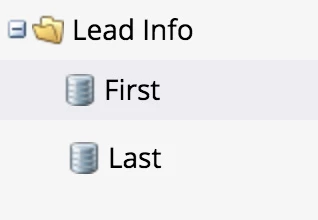
I think the fields are just called First and Last

1 reply

Frank_Breen2
Frank_Breen2Accepted solution
New Participant
March 14, 2016

I think the fields are just called First and Last

Jenn_DiMaria2
New Participant
March 14, 2016

You're right. Wow. Well, that's nutty since they're not referenced as such anywhere else I've seen. Thank you!

Dan_Stevens_
New Participant
March 14, 2016

That's where it gets confusing - that the API name usually differs from the name of the field in "field management" and why it would be useful for Marketo to provide the API name ( ).  For example, when you want to use FIRSTNAME in a token, {{lead.First Name}} is the correct name.