Blocking field change of custom data field in person details | Community
Skip to main content
New Participant
May 10, 2022
Solved

Blocking field change of custom data field in person details

  • May 10, 2022
  • 1 reply
  • 1896 views

Hi everybody, 

creating custom data fields this fields will appear in the detail view of a person. 


Some system fields are configured that way that you can see this fields in that view but you can't change it's values. 
Is it possible to configure my custom fields the same way? 

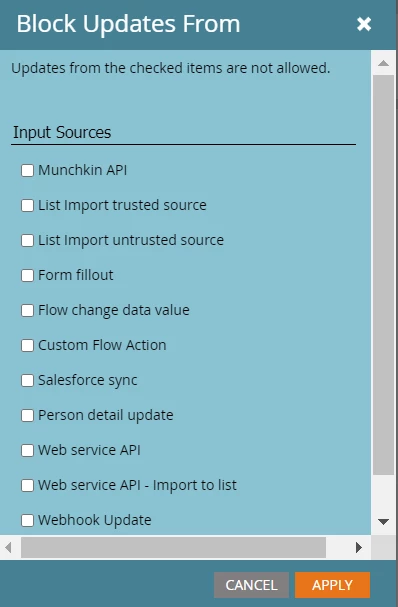
I already tried the options of "Block field updates" in the field manager. But this didn't seam to take affect. The field I tried to block is still shown as a regular input field. 

Any ideas? 

thanks and best regards. 

Wolfram 
This post is no longer active and is closed to new replies. Need help? Start a new post to ask your question.
Best answer by Darshil_Shah1

AFAIK, only the system managed fields and the fields that Marketo does not have access to add/update data (e.g. company fields for a contact record, Opportunity fields, etc.) is shown as in-editable in Marketo. With that being said, if you block the field update in the field management section for the input sources you would not want to update the data in Marketo, it'll work - just that the field will still show as an editable field when viewed in the person profile page, but data won't update from the input sources you block in the field management section. 


1 reply

Darshil_Shah1
Darshil_Shah1Accepted solution
Community Manager
May 10, 2022

AFAIK, only the system managed fields and the fields that Marketo does not have access to add/update data (e.g. company fields for a contact record, Opportunity fields, etc.) is shown as in-editable in Marketo. With that being said, if you block the field update in the field management section for the input sources you would not want to update the data in Marketo, it'll work - just that the field will still show as an editable field when viewed in the person profile page, but data won't update from the input sources you block in the field management section. 


New Participant
May 10, 2022

@darshil_shah1 
Oh Ok. That's a confusing UX/UI behavior. 

Thank you!

Darshil_Shah1
Community Manager
May 10, 2022

I wouldn't say 100% confusing, but it would certainly help if there was small tool-tip kind of thing (or something alike) against the fields with field updates blocked that showed the input sources from which the updates are blocked when viewed in the person profile page. 🙂