Break-word/stop hyphenating in Outlook 2016 | Community
Skip to main content
New Participant
March 22, 2021
Solved

Break-word/stop hyphenating in Outlook 2016

  • March 22, 2021
  • 1 reply
  • 8871 views

Hi all,


Looking for some help to eliminate wrapping and hyphenating words inside td's when rendering in Outlook 2016. It is not an issue on Gmail, Outlook Web, or Outlook Mobile; it's just the Outlook 2016 desktop app.
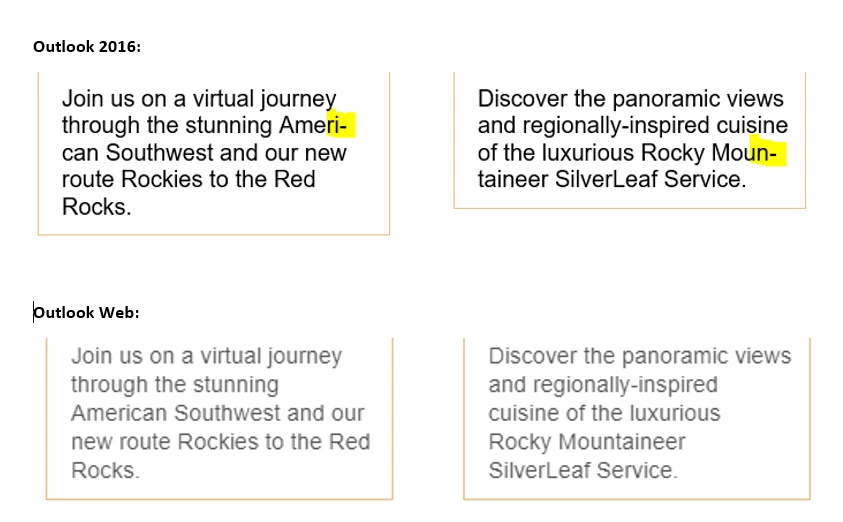


I'd rather the broken word be placed unbroken on the next line rather than hyphenated, which is a little difficult to read.


Per some search results I found, I've tried adding: word-break:break-word, -ms-word-break:break-word, and -mso-word-break:break-word" to all of td, p, and body to no avail. I'm also having trouble finding an property that works in Outlook 2016 per the Campaign Monitor tool.


Thanks in advance!


My code:

[removed]
This post is no longer active and is closed to new replies. Need help? Start a new post to ask your question.
Best answer by Dave_Roberts

Hey @derekw you might check out "Can I Email" https://www.caniemail.com/ as a replacement to the Campaign Monitor list you're using here. The Campaign Monitor stuff has been notoriously behind and it looks like the last update was in 2017 so it's probably not accurate anyway.


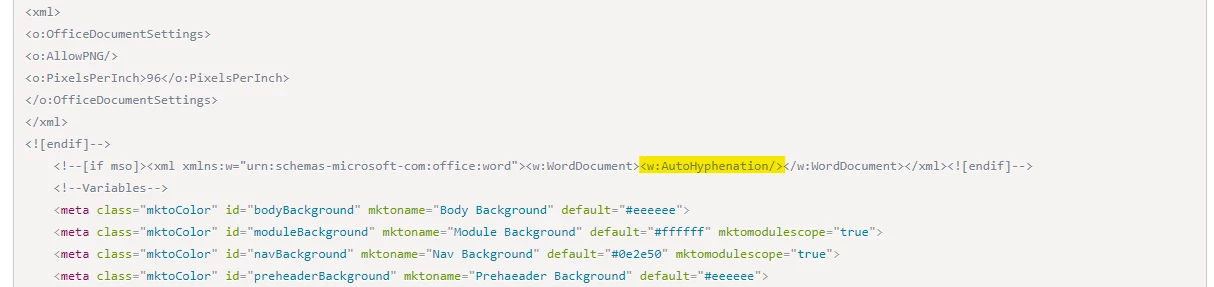
It looks like the Outlook conditional code that you're using has the "w:AutoHyphenation" property set, this might have something to do with it? Maybe try removing the highlighted piece in the code and see if that stops the auto hypenating?


The other setting I'll tinker around with for stuff like this is "white-space", you might also check out "overflow-wrap" as they're all kinda in a similar vein.


1 reply

Dave_Roberts
Dave_RobertsAccepted solution
New Participant
March 23, 2021

Hey @derekw you might check out "Can I Email" https://www.caniemail.com/ as a replacement to the Campaign Monitor list you're using here. The Campaign Monitor stuff has been notoriously behind and it looks like the last update was in 2017 so it's probably not accurate anyway.


It looks like the Outlook conditional code that you're using has the "w:AutoHyphenation" property set, this might have something to do with it? Maybe try removing the highlighted piece in the code and see if that stops the auto hypenating?


The other setting I'll tinker around with for stuff like this is "white-space", you might also check out "overflow-wrap" as they're all kinda in a similar vein.


derekwAuthor
New Participant
March 25, 2021

Worked like a charm - thank you!