Broken Webinar Registration Sync | Community
Skip to main content
March 8, 2017
Solved

Broken Webinar Registration Sync

  • March 8, 2017
  • 10 replies
  • 7203 views

Hi All,


Strange turn of events this morning in my instance. I was running test form fills for a webinar and when I filled it out everything was fine, but when my director filled it out he never got an email from GoToWebinar and then noticed this we noitced this in Marketo
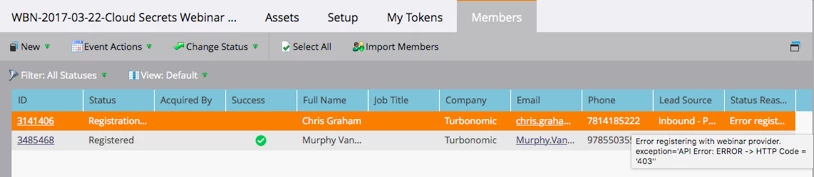
The program still says it is linked to my webinar but it is not tking over registrants, any thoughts?

Best,

Murph
This post is no longer active and is closed to new replies. Need help? Start a new post to ask your question.
Best answer by Dan_Stevens_

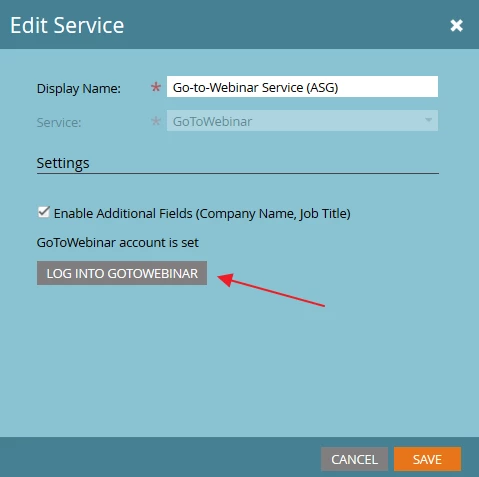
Hi Murph - no, we simply click the "Log into GTW" button and relogin.

10 replies

KellyJoHorton
New Participant
January 24, 2019

I have confirmed with Marketo that the random disconnects are a bug, and the issue has been escalated.

In the meantime, we just ran a webinar in EMEA this morning and I didn't know the GTW connection had disconnected with the 400 error, so none of the attendee statuses got updated in Marketo. Is there a way to force GTW to update statuses? (push the data to Marketo). Or do we have to manually export the list from GTW and import the status updates to Marketo? Such a pain.

Kelly Jo HortonSenior Client PartnerEtumos503.928.1928khorton@etumos.com
KellyJoHorton
New Participant
December 11, 2018

I know this is a really old thread, but I want to confirm this is still happening. I refreshed my token less than a month ago, and got the dreaded 400 sync error overnight. I now have to keep a smart list of people who have a program status of Webinar > Registration Error just to know when the sync is failing.

Kelly Jo HortonSenior Client PartnerEtumos503.928.1928khorton@etumos.com
Heloise_Briere1
New Participant
August 18, 2017

I'm having the same API Error too, but refreshing/re-logging into GTW doesn't do anything. It seems that the APi is fine after I refresh & save in LaunchPoint, but when I manually try to refresh the event, it keeps showing me the same Error message. Any help is welcome!

Heloise Briere
August 21, 2017

When I was having this issue, I had my other admin try reconnecting the GTW launch point with our login credentials and it worked in her login, but kept not working for mine. If you can give someone else temporary admin credentials and have them try to reconnect I'd start there.

I've been having to baby sit it. I always create an add to list flow, so I can double check my registration list to GTW. I've had to register a handful manually to the GTW landing page that failed in Marketo.

July 7, 2017

I'm having a similar issue (different error code "FailedAPI Error: ERROR->HTTP Code = '400')

When going to LaunchPoint and trying to resign in, it fails to launch the sign in page.

March 10, 2017

Hi Murphy,

just talked to G2W. Tokens expire after one year. I quote:

"This is using our public external APIs use standard authentication token (oauth). These tokens (like every token) are valid for a certain time period (1 year) through our external API gateway. Having infinite token’s is a security risk, in the past, 1 year was by far the longest our security team allowed."

They are working on either notifying their customers that the tokens expire or work with the Marketo side to using an auto refresh functionality which is already used by a couple of integration partners.

March 8, 2017

Hi All,

Thank you for your thoughts.

Quick update, doing some more thorough digging it appears that both the syncs to both of GoToWebinars broke simultaneously which I found quite odd. The credentials for the accounts are up to date and have not changed. I contacted support.

Have any of you all heard about this?

Thank you for all the help.


Best,

Murph

New Participant
March 8, 2017

I haven't heard of anything specifically around GTM, but something similar did happen with WebEx a few months back -- essentially all WebEx API users were logged out across Marketo instances.  Anyone affected had to re-input their credentials in Launchpoint (even if they hadn't technically changed).  That might be worth a shot in this case, as others have suggested.

Josh_Hill13
New Participant
March 8, 2017

you might also try refreshing the webinar sync on the Program tab.

Iryna_Zhuravel4
New Participant
March 8, 2017

We had this happening more times that I care to remember. Gotowebinar became very unreliable in the past year.

We are moving Zoom and not looking back

March 8, 2017

Happened to us as well. In order to capture that we have created a little listening campaign that sends an alert if registration errors happen:

Dan_Stevens_
New Participant
March 8, 2017

Yep, we did the same thing!

Kevin_McMahon1
New Participant
February 12, 2018

We used to send alerts as well, but some people complained about the number of alerts they were receiving (we seem to have to refresh our connection every week).

Has anyone else found a different way to solve this problem?

Does GTW sync everyone with the registered status in Marketo? If so, I could activate a batch campaign to run once or twice a day for each webinar program and will change status Registration Error --> Registered. Preferably I would rather not add a campaign to our template solely for this problem, but having trouble thinking of other solutions. Thoughts on this?

Dan_Stevens_
New Participant
March 8, 2017

This has happened to us in the past. Go into admin and re-establish the connection. That did it for us.

March 9, 2017

Hi Dan,

When you re-establish the connection do you take your old API offline or just create a new one? I ask because currently mine is being used by 87 programs and in order to remove it I must make sure that it is not in use, but once members joined a program you cannot break the event partner.

Best,

Murph

Dan_Stevens_
Dan_Stevens_Accepted solution
New Participant
March 9, 2017

Hi Murph - no, we simply click the "Log into GTW" button and relogin.