Bulk Export Design Studio Assets | Community
Skip to main content
Level 2
September 27, 2021
Solved

Bulk Export Design Studio Assets

Hi! We are attempting to export nearly 400 images from Design Studio on one MKTO instance, then upload them to Design Studio on another instance. 


I generally followed this article: https://nation.marketo.com/t5/knowledgebase/export-design-studio-assets/ta-p/299249 with the intention to collect all file locations in instance #1 and use Microsoft Excel Visual Basic to download the files into a local folder, then upload to instance #2 through Design Studio. 

Rather than using a scraper for steps 1-5, I followed this article https://nation.marketo.com/t5/knowledgebase/export-design-studio-assets/ta-p/249458 to get the URLs via Marketo's REST API folder browse feature (using Postman). That worked great! Now I have the URLs for all the images in instance #1. 

However, I ran into a bit of a dead end with actually downloading those images. The original article links an image with the MacroScript that is broken. I couldn't find another article in the community with a solution. 

Does anyone have any suggestions for next steps? 

This post is no longer active and is closed to new replies. Need help? Start a new post to ask your question.
SanfordWhiteman
SanfordWhitemanAccepted solution
Level 10
September 30, 2021

Seems to me a downloader utility is the way to go, once you have the list of URLs.


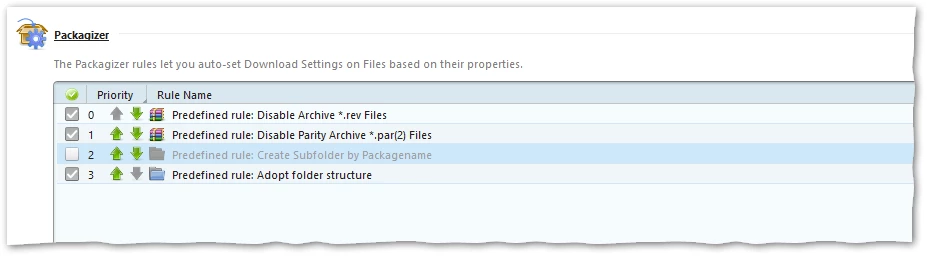
I played with the quite amazing JDownloader for a few minutes and if you set Settings » General » Download Folder and then uncheck the "Create Subfolder..." rule in the Packagizer settings...

... then you can paste the whole list into the LinkGrabber, start the download, and have a folder to zip up.


Another method would be to write a batch/shell script that uses cURL and a command-line Zip utility.

4 replies

SanfordWhiteman
Level 10
September 28, 2021
Yikes, interestingly broken article. We should look into that (I wasn’t the original author, or I’d update it).

What is your intended output? A zip file, some elegant document type... ?

Translate
Level 2
September 28, 2021

@sanfordwhiteman  Currently, I have the URLs for all the Design Studio image/png files from Instance #1 listed in a .xlsx.

My ideal output is a zip folder with the .png and/or .jpg files, although I'm open to alternatives. 

Translate
McKayla Gallup
SanfordWhiteman
SanfordWhitemanAccepted solution
Level 10
September 30, 2021

Seems to me a downloader utility is the way to go, once you have the list of URLs.


I played with the quite amazing JDownloader for a few minutes and if you set Settings » General » Download Folder and then uncheck the "Create Subfolder..." rule in the Packagizer settings...

... then you can paste the whole list into the LinkGrabber, start the download, and have a folder to zip up.


Another method would be to write a batch/shell script that uses cURL and a command-line Zip utility.

Translate