Campaign Priority Override: See all Overridden Campaigns | Community
Skip to main content
New Participant
June 14, 2022
Solved

Campaign Priority Override: See all Overridden Campaigns

  • June 14, 2022
  • 1 reply
  • 2355 views

Hi there,


Does anyone know if it is possible to see all campaigns whose priority has been manually overridden in one place?


I have been storing them all in a Google Doc under "High", "Medium", and "Low" section

This post is no longer active and is closed to new replies. Need help? Start a new post to ask your question.
Best answer by Darshil_Shah1

I don't think that's possible as of now.


The only couple of ways that I'm aware that you can see this (and that too by going to individual campaigns) is either - 

  1. By right clicking individual trigger campaigns and selecting the "Override campaign override" option, in the dialog that open subsequently shows the campaign execution priority and if the default campaign priortiy has been overriden or not.
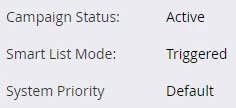
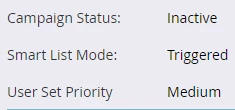
  2. By heading over to the Schedule tab, if the Campaign priority is default (i.e., not overriden) it shows "System Priority - Default", else if it's overriden by the user, it shows "User Ser Priority - <overriden priority - Meduim/High/Low>" - I've added snapshots how it's shown in the Schedule tab below:

Default campaign execution priority not overriden
 

Default campaign execution priority overriden and set to Medium by user
 

It'd be great to have a couple columns added to added to the Campaign Inspector tab that'll show if the campaign priority and whether the default campaign priority has been overriden or not for all the trigger campaigns at one place.


1 reply

Darshil_Shah1
Darshil_Shah1Accepted solution
Community Manager
June 15, 2022

I don't think that's possible as of now.


The only couple of ways that I'm aware that you can see this (and that too by going to individual campaigns) is either - 

  1. By right clicking individual trigger campaigns and selecting the "Override campaign override" option, in the dialog that open subsequently shows the campaign execution priority and if the default campaign priortiy has been overriden or not.
  2. By heading over to the Schedule tab, if the Campaign priority is default (i.e., not overriden) it shows "System Priority - Default", else if it's overriden by the user, it shows "User Ser Priority - <overriden priority - Meduim/High/Low>" - I've added snapshots how it's shown in the Schedule tab below:

Default campaign execution priority not overriden


Default campaign execution priority overriden and set to Medium by user


It'd be great to have a couple columns added to added to the Campaign Inspector tab that'll show if the campaign priority and whether the default campaign priority has been overriden or not for all the trigger campaigns at one place.


TyronPrAuthor
New Participant
June 15, 2022

Thanks for the detailed response @darshil_shah1 


I have created an idea here for this feature: https://nation.marketo.com/t5/ideas/see-all-overridden-campaign-priorities-in-one-place/idi-p/326246/highlight/true