It's not "all or nothing" with Marketo! You can limit what people can do by limiting what permission the Role associated with their user has. You can check the existing Roles / Create a new Role by navigating to Marketo > Admin > Users & Roles > Roles. Marketo has a well-documented list of permissions you can enable/disable for a Role in its product documentation here. As a best practice, I'd recommend you follow the Principle of least privilege that recommends limiting users' access rights to only what are strictly required to do their jobs.
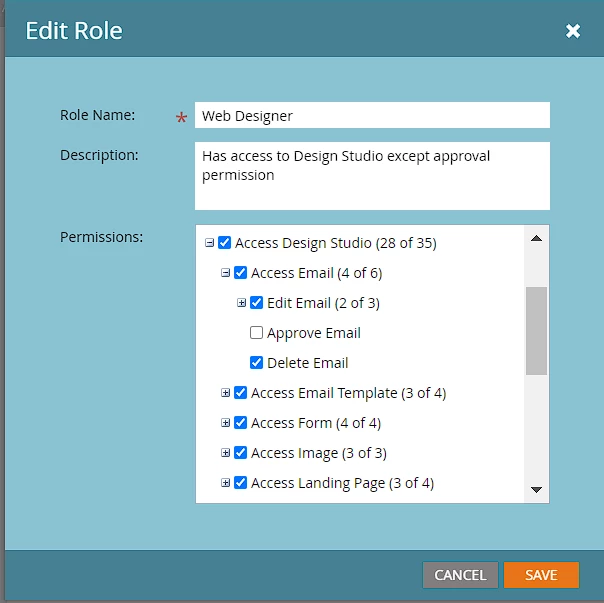
Below is the snapshot of the permissions enabled for the Web Designer role that comes out of the box. As you can notice, it has got Design Studio permissions, but can't approve emails. Similarly, you can create custom Roles/modify existing ones to have the required permissions a user would need to perform their job, and at the same time limit them from accessing/doing what they aren't supposed to do.
Additionally, if you have workspaces, you can also limit access to certain workspaces if required. Check out this product documentation on managing user access to Workspaces.
Regarding training, I'd suppose they ought to know the piece of the puzzle they're supposed to work on and the reqd. Marketo caveats, and processes around it, e.g., a designer should know the Marketo template syntax along with how to create responsive templates. Similarly, a user managing your marketing activities should know all about programs, your processes around creating programs, campaigns, email assets, troubleshooting stuff, etc. A marketing ops person may not know how to create a template from scratch and similarly, a template developer may not have much idea about creating programs, campaigns, etc. As long as everyone knows what they're supposed to do, you should be good.
