Can auto populate form field? | Community
Skip to main content
New Participant
August 4, 2016
Solved

Can auto populate form field?

  • August 4, 2016
  • 1 reply
  • 3138 views

Hi -

We have a "Request Demo" form that can be accessed from all our site's product pages.

This current form, supplied by our IT department, uses a query string value, possibly coupled with JavaScript to populate the "Model You're Interested In" field.

We're interested in replacing this, and another similar form with a Marketo form, and wonder if this "auto-population" functionality can be achieved.

Thanks for any suggestions.

Best answer by SanfordWhiteman

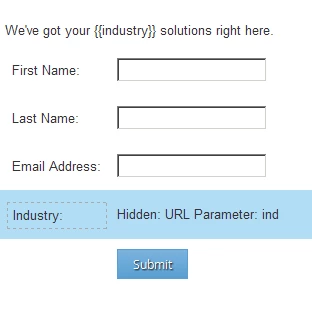
There's no specific documentation. An example of the second approach would be this form...

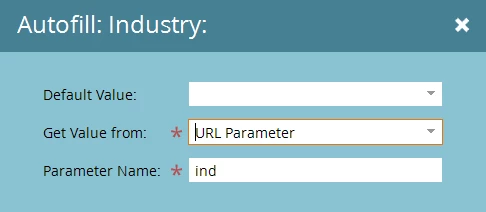
...which has this hidden field w/AutoFill from a query param enabled...

...and this Rich Text field...

With a tiny bit of JS you can bring the hidden field into the open (as well as posting it with the form):

http://s.codepen.io/figureone/debug/6ce729cf3c85f61bd286fb41b81af5ac?ind=Construction

http://s.codepen.io/figureone/debug/6ce729cf3c85f61bd286fb41b81af5ac?ind=Medicine

1 reply

SanfordWhiteman
New Participant
August 4, 2016

Yes. This is basic JS interpolation of query parameters (just as it is in your current form).  On a Marketo form, you have two choices: use generic JS, or use the Marketo built-in hidden field AutoFill functionality to parse the value, then unhide the value afterward.

New Participant
August 4, 2016

Thanks, Sanford.

Your reply affirms my suspicions that it can be accomplished with a Marketo form. The broad strokes that you supplied help me to understand the concept, however I need more granular instructions. Can you point me to documentation that might guide me through it?

Many thanks!

SanfordWhiteman
SanfordWhitemanAccepted solution
New Participant
August 5, 2016

There's no specific documentation. An example of the second approach would be this form...

...which has this hidden field w/AutoFill from a query param enabled...

...and this Rich Text field...

With a tiny bit of JS you can bring the hidden field into the open (as well as posting it with the form):

http://s.codepen.io/figureone/debug/6ce729cf3c85f61bd286fb41b81af5ac?ind=Construction

http://s.codepen.io/figureone/debug/6ce729cf3c85f61bd286fb41b81af5ac?ind=Medicine