can someone explain how "campaign is requested" works? | Community
Skip to main content
August 20, 2018
Solved

can someone explain how "campaign is requested" works?

  • August 20, 2018
  • 2 replies
  • 15938 views

to be specific, I'm seeing the following

"Campaign is Requested = Marketo Flow Action" < Trigger

what exactly does this mean? I tried looking in the product doc but not getting a clear cut answer.

and additionally, how does the "Request Campaign" (Flow) work?

Thanks!

This post is no longer active and is closed to new replies. Need help? Start a new post to ask your question.
Best answer by Dan_Stevens_

You can also think of a requested campaign as a sub-routine to the main smart campaign.  The important point to realize though is the requested campaign runs in parallel with any additional flow steps contained in the parent campaign (it doesn't run like a true sub-routine that first completes before any additional logic/flow steps are run in the parent campaign).  So you may need to get creative with wait steps if you want the requested campaign to finish running before continuing on with the flow steps in the parent campaign.

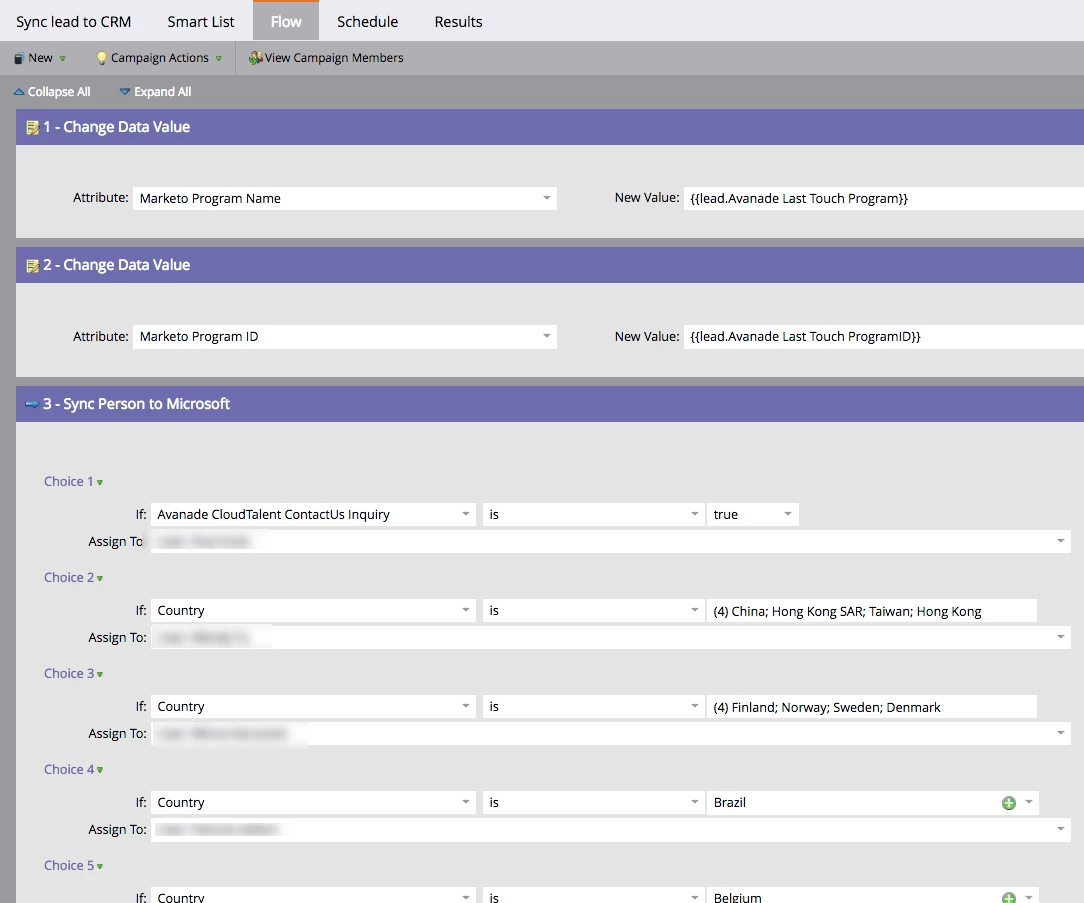
Another good use-case for requested campaigns is for repeatable logic/steps that many campaigns can refer to - rather than build the same logic within each smart campaign that needs it.  We have a single "sync to CRM" smart campaign that has all of the required logic - in our case, assign leads to country marketers based on country value.  And every smart campaign in our lead lifecycle program that would otherwise have these sync rules as additional flow steps within the campaign - now can simply request this central smart campaign whenever needed.

Here's the central "Sync Lead to CRM" smart campaign:

And one of the many smart campaigns that requests it as part of the overall flow:

As you you can see, this is a very scalable approach and makes maintaining the lead owners very easy since it's only done once.

2 replies

Dan_Stevens_
Dan_Stevens_Accepted solution
New Participant
August 21, 2018

You can also think of a requested campaign as a sub-routine to the main smart campaign.  The important point to realize though is the requested campaign runs in parallel with any additional flow steps contained in the parent campaign (it doesn't run like a true sub-routine that first completes before any additional logic/flow steps are run in the parent campaign).  So you may need to get creative with wait steps if you want the requested campaign to finish running before continuing on with the flow steps in the parent campaign.

Another good use-case for requested campaigns is for repeatable logic/steps that many campaigns can refer to - rather than build the same logic within each smart campaign that needs it.  We have a single "sync to CRM" smart campaign that has all of the required logic - in our case, assign leads to country marketers based on country value.  And every smart campaign in our lead lifecycle program that would otherwise have these sync rules as additional flow steps within the campaign - now can simply request this central smart campaign whenever needed.

Here's the central "Sync Lead to CRM" smart campaign:
And one of the many smart campaigns that requests it as part of the overall flow:
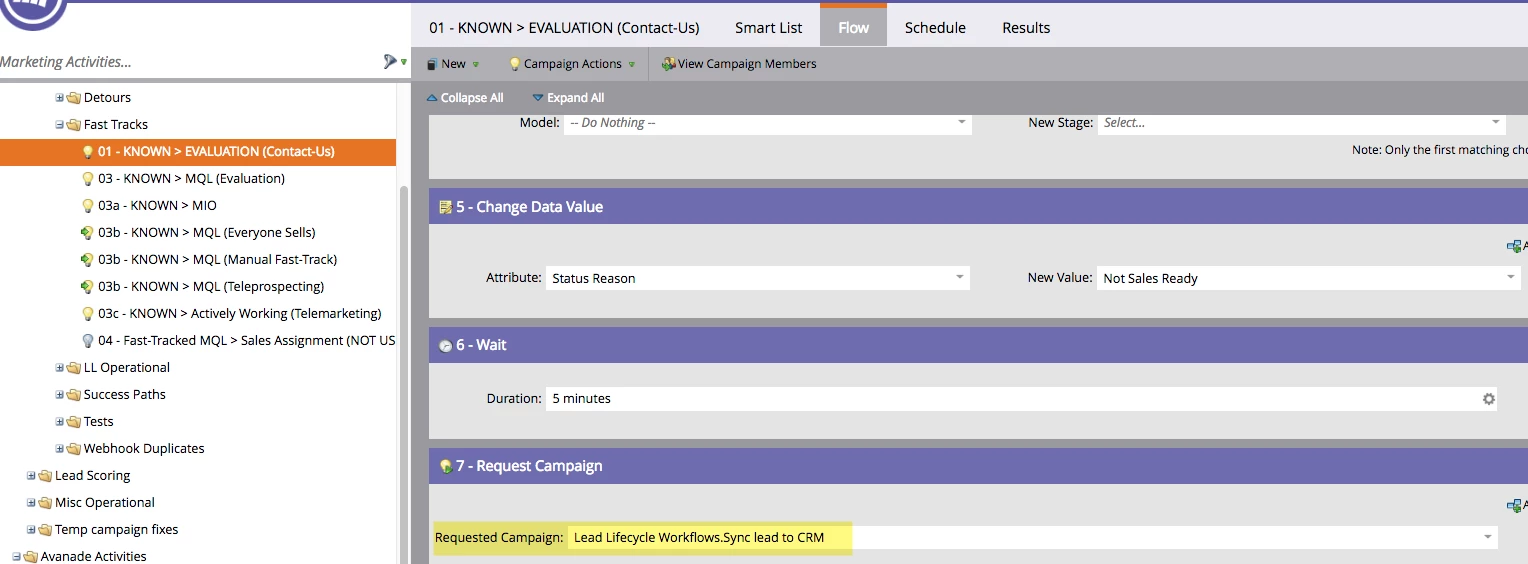
As you you can see, this is a very scalable approach and makes maintaining the lead owners very easy since it's only done once.

Grace_Brebner3
New Participant
August 21, 2018

This is a great example of using them to scale efficiently

Side note - are you seeing any load/speed impacts through this method? I've not personally experienced it but have anecdotally heard that request campaigns at scale can be a little slow - I believe overall in the system they get prioritised last?

Dan_Stevens_
New Participant
August 22, 2018

Even though requested campaigns are executed at a lower priority, we haven’t noticed any negative impact in our environment.

Grace_Brebner3
New Participant
August 20, 2018

Hey Malik,

Campaign is requested and Request Campaign are basically paired flow>trigger steps.

A really good use case for them tends to be situations where you require a campaign to be triggered for a specific functionality to work, but the campaign would otherwise be a batch campaign - good example being triggering an SMS send via webhook (as webhooks require a trigger to work and don't work on batch campaigns).

So, you have Smart Campaign A which has your audience criteria in the smart list, then request campaign in the flow step, referring to Smart Campaign B, which has the campaign is requested trigger, and the web hook call in the flow step.

Note - you have to have an active smart campaign with the campaign is requested trigger in order to see any options in the request campaign flow step - so you'd have to activate Campaign B and then batch run Campaign A in that order.

Hope that helps explain