
Can't Add Default Program to Engagement Stream | Community
Skip to main content
michellechopin
Community Manager
November 10, 2023
Solved

Can't Add Default Program to Engagement Stream

  • November 10, 2023
  • 2 replies
  • 2190 views

Happy Friday, Community Friends!


I'm not sure if I'm being dim or if I've done something wrong or if Marketo is being a jerk today. I've just set up a few more default programs to add to my existing/active Engagement Program and I can't add the program to the stream.


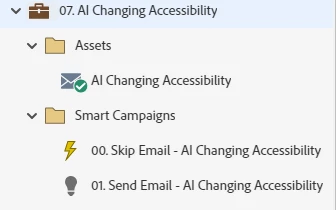
The email within the program is approved/active, the Skip Email Campaign is activated, the Send Email Campaign includes "Member of Engagement Program = {{This Nurture}}".


Here's a quick screenshot of the Default Program itself (which I cloned from the prior default programs so I knew all the details were going to be included): 
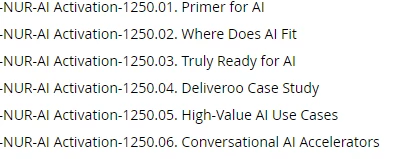
When I search for the Program in the stream, I only see the 6 programs that are already active in there:
 

What am I missing? I have tried deactivating the Trigger campaign and also turning the entire nurture off, but neither seems to get that Program to show. I hope it's user error and I'll roll my eyes at myself when I learn what the issue is 😋


Thanks in advance!

Michelle

This post is no longer active and is closed to new replies. Need help? Start a new post to ask your question.
Best answer by michellechopin

Apparently, Marketo was being slow and now those programs are available to me in the Stream.


Must just be a Friday 😋


Happy weekend, all!

Michelle

2 replies

Darshil_Shah1
Community Manager
November 12, 2023

Glad you figured this out eventually! TBH, this is a bit strange; I've never experienced this with Engagement programs. It's usually best to wait for a few minutes (sometimes a few hours) in case one isn't able to select or see the asset/program/see the update.

michellechopin
Community Manager
November 13, 2023

I'd never experienced that either and I had left about 10-15 minutes between turning those campaigns on and trying to add them to the stream, so I was quite confused (and because I couldn't see anything different from other programs that were showing, nor remember that I had done anything different myself).


I would also love it if, like training videos, one could actually drag and drop emails or programs into the streams - that would make that process a little smoother (especially in a circumstance like this or one where there are a number of items to add back to back).


My colleague always says that, when you ask a question out loud, the answer comes to you, and I feel like this was one of those occasions (and a good thing to remember that sometimes, we might need a few hours for things to sort themselves out!).


Appreciate you acknowledging my post as always @darshil_shah1  😀

Michael_Florin-2
New Participant
November 13, 2023

I would also love it if, like training videos, one could actually drag and drop emails or programs into the streams


That feature existed once, but it was killed through a UI update not too long ago.


(I now could suggest to you to open an Idea here, but I've lost faith in the process, so I won't do it...)

michellechopin
michellechopinAuthorAccepted solution
Community Manager
November 10, 2023

Apparently, Marketo was being slow and now those programs are available to me in the Stream.


Must just be a Friday 😋


Happy weekend, all!

Michelle