Can we control the option area for the select fields in Marketo Form? | Community
Skip to main content
New Participant
July 22, 2022
Solved

Can we control the option area for the select fields in Marketo Form?

  • July 22, 2022
  • 2 replies
  • 3192 views

Hi,


I am facing an issue while using select fields in the Marketo Form, if the option value is larger than the select box width then the options box width expand accordingly, and look wider than the select field area. Is there something we can control the width of the option values box? Attaching a screenshot for reference. 
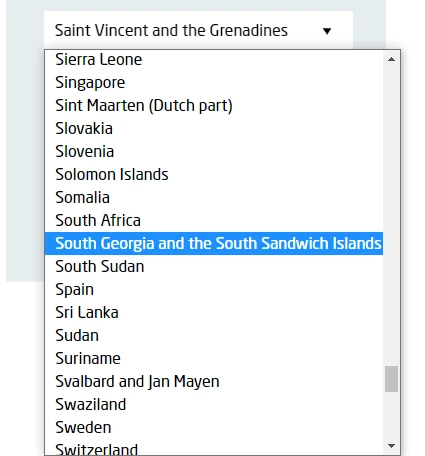


Any suggestion would be very helpful.


Thanks!

Jasbir

This post is no longer active and is closed to new replies. Need help? Start a new post to ask your question.
Best answer by Dave_Roberts

Hey Jasbir,


As far as I know this is not possible using the native <select> field in a Marketo Form -- you'd need to create a custom HTML/CSS element that was a "pseudo-select" element to get something like this to work. It might be worth noting that this'll show up differently depending on which browser you're looking at as well.


Here's an article from stackoverflow with some details for reference: https://stackoverflow.com/questions/7208786/how-to-style-the-option-of-an-html-select-element


The only ideas I've got to work around this would be to expand the width of the form itself to give the select a bit more room to match up with the longer options or to make the font-size of the fields smaller maybe?

2 replies

SanfordWhiteman
New Participant
July 22, 2022

Like Dave says, this isn’t a “Marketo form” thing, it’s common to all native HTML forms. Unlike some hacked-together form builders, Marketo does the right thing and uses a true form and native input elements.


You might consider a 3rd-party widget, but be aware that it’s almost impossible to preserve mobile usability without using a true select. Which means mobile users will still see the overflow, although of course the overall UI is very different.

JasbirkaAuthor
New Participant
July 28, 2022

Sure @sanfordwhiteman & @dave_robertsand Thanks for your valuable comments.

Dave_Roberts
Dave_RobertsAccepted solution
New Participant
July 22, 2022

Hey Jasbir,


As far as I know this is not possible using the native <select> field in a Marketo Form -- you'd need to create a custom HTML/CSS element that was a "pseudo-select" element to get something like this to work. It might be worth noting that this'll show up differently depending on which browser you're looking at as well.


Here's an article from stackoverflow with some details for reference: https://stackoverflow.com/questions/7208786/how-to-style-the-option-of-an-html-select-element


The only ideas I've got to work around this would be to expand the width of the form itself to give the select a bit more room to match up with the longer options or to make the font-size of the fields smaller maybe?