Can you have a trigger AND filters in one Smart Campaign? | Community
Skip to main content
New Participant
October 21, 2015
Solved

Can you have a trigger AND filters in one Smart Campaign?

  • October 21, 2015
  • 2 replies
  • 9166 views

Hi all,


This might be a really stupid question but I'm hoping that someone can confirm that you cannot have a trigger and a filter in the same Smart Campaign, right?

My example is such:  for all our events, leads can move through our campaign flow via static List upload in Marketo or direct entry in SFDC by Sales. So ideally I'd like each flow step to have the following:
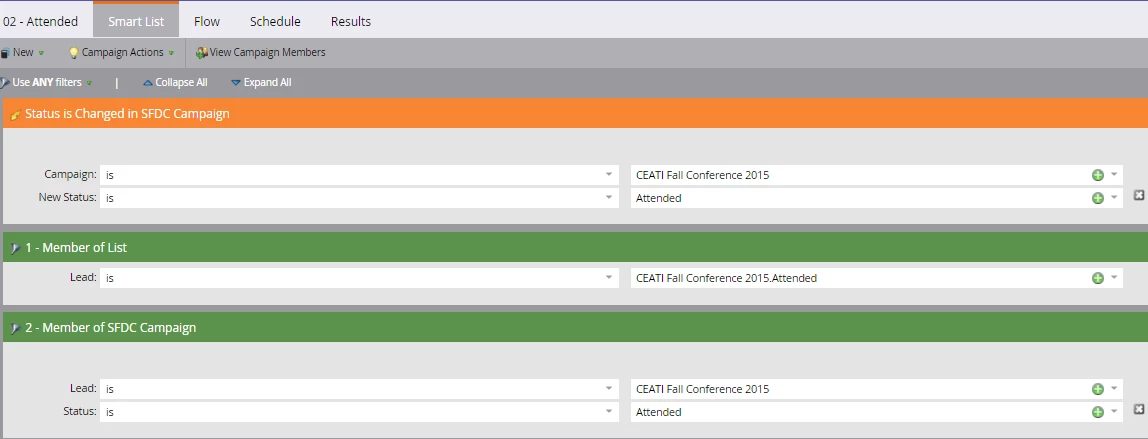
Where the trigger could be a status change in SFDC OR merely that they appear in the campaign in SFDC OR that they get uploaded to a List in the campaign.

I'm feeling like if I want to cover all my bases I would have to set up 2 different campaigns for each step:

  • 1 trigger campaign for the SFDC status change trigger
  • and then another filter batch campaign for the addition to a static list, either in SFDC or Marketo

If anyone could confirm for me, I would really appreciate it!

Thanx!

Xara

This post is no longer active and is closed to new replies. Need help? Start a new post to ask your question.
Best answer by JohnCl9

Hi Vlada,

Triggers are not part of the Advanced Logic.  Only filters are counted.

Triggers will always be OR operators, and the filters will only be evaluated when the trigger fires.

2 replies

Christian_Tovar
New Participant
June 6, 2019

Hello, I'm not sure how to test this but I want to send two different emails based on their response to the form. Is this the correct setup?

New Participant
June 17, 2024

Hi,


In Campaign FLOW,  add Send Email with Add Choice


Choice 1 :

if  Travel Type is Charter

Email : Email 1


if Travel Type is Others

Email : Email 2

Dan_Stevens_
New Participant
October 22, 2015

NOTE: you should post these types of questions in the "Products & Support > Discussions" area to get better visibility.

Yes, you can mix both triggers and filters in the smart list of a smart campaign.  We do it all of the time (see example below where we have a smart campaign used for both contact-us form submissions and those rare instances where we need to manually import a contact-us request into the program).  Just know that the trigger must be true in order for it to evaluate the filters.  And if you have multiple triggers, the logic will be T1 or T2 or T3, etc.  You can even use advanced filter logic once you have 3 or more filters.

Vlada_Prasolova
New Participant
February 2, 2016

i have a similar question - can i mix this with advanced smart list filter logic?

for example:

will this still work in my case?

or it should be trigger + ALL fields?

JohnCl9Accepted solution
Employee
February 2, 2016

Hi Vlada,

Triggers are not part of the Advanced Logic.  Only filters are counted.

Triggers will always be OR operators, and the filters will only be evaluated when the trigger fires.