
Cannot manually edit pick-list fields | Community
Skip to main content
Eva_Yu
New Participant
August 7, 2017
Solved

Cannot manually edit pick-list fields

  • August 7, 2017
  • 3 replies
  • 4731 views

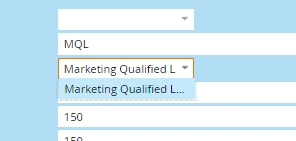
I just realized that I cannot edit the pick-list fields in marketo. Is this standard? Those fields were created from SFDC and synced to Marketo. However, some times some leads may have the wrong value in it, and I tried to edit it in Marketo, but the picklist only shows the one value. The same field in SFDC has mutiple values and can be edited in SFDC and sync to Marketo.
This post is no longer active and is closed to new replies. Need help? Start a new post to ask your question.
Best answer by Dan_Stevens_

Even though the values may come from a picklist, when clicking on the drop-down arrow for a select field on the lead record, Marketo will only show the current value (or values that have the same string of text that's currently in the field) or any value that may have populated that field (by any lead) in the past.  So if you want to view all of the possible values containing all possible picklist values - then simply delete the value and then click the drop-down (on an empty field).  Just beware that these data value changes could trigger off some processes/smart campaigns behind the scenes.

3 replies

Eva_Yu
Eva_YuAuthor
New Participant
August 7, 2017

Thank you both. I guess I will just go to SFDC to edit the value. Very inconvenient though.

Dan_Stevens_
New Participant
August 7, 2017

Actually, this is preferred for source fields that exist in CRM.  You should always change the values at the source field level. 

The inconvenient piece is when you have that field scattered across multiple forms and you need to manually force an update of those values - they don't update automatically:

The other inconvenience is when you have a standard multi-select field in Marketo used across several forms (and not a field that's synced to CRM).  If you ever want to change those values, you have to edit that field within every form:

Eva_Yu
Eva_YuAuthor
New Participant
August 7, 2017

Hi Dan,

The field I was trying to update  is actually generated from Marketo. We had to create it in SFDC due to Marketo's lack of ability to create picklist fields. I wonder what's the situation with leads only in Marketo. Am I still not able to edit the field?

Grant_Booth
New Participant
August 7, 2017

^ What Dan said. Also beware that if the field maps to both a lead and contact picklist field in SFDC, it will only prepopulate values that exist on BOTH fields in SFDC.
That is, if the lead field has values A, B, and C while the contact field has values B, C, and D, then only values B and C will display in the dropdown.

Dan_Stevens_
Dan_Stevens_Accepted solution
New Participant
August 7, 2017

Even though the values may come from a picklist, when clicking on the drop-down arrow for a select field on the lead record, Marketo will only show the current value (or values that have the same string of text that's currently in the field) or any value that may have populated that field (by any lead) in the past.  So if you want to view all of the possible values containing all possible picklist values - then simply delete the value and then click the drop-down (on an empty field).  Just beware that these data value changes could trigger off some processes/smart campaigns behind the scenes.