Capturing the Referring URL | Community
Skip to main content
New Participant
November 21, 2016
Solved

Capturing the Referring URL

  • November 21, 2016
  • 3 replies
  • 5825 views

Hello,

When you look at metrics for marketo landing pages, is there an ability to determine a referring URL i.e. what site the visitor to the landing page came from (e.g linked in, facebook etc)?

Thanks,

Tom

Best answer by ErikHe1

Hi Tom,

Grégoire makes a great point that you should add the GA tracking script to your landing page templates so it is always present. I don't know what best practice is but you can also set up a separate property in GA for your landing pages.

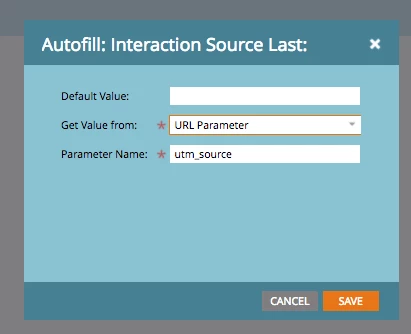
A separate feature you can use is a custom hidden field for your utm parameter that captures the corresponding utm parameter. You add the field to your form, change "Field Type" to Hidden in the rightside menu and then choose autofill and add the URL parameter for e.g. utm_source and it will grab the value into the field once the lead converts.

You can do this for all five utm parameters to make sure to always capture it, this also works on embedded forms on your website.

/Erik

3 replies

SanfordWhiteman
New Participant
November 21, 2016

In addition to the other comments, if you aren't running your LPs over , you will flat-out lose some referrer data (in both GA and Marketo). A longstanding (90's era) but little-understood security restriction.

ErikHe1Accepted solution
New Participant
November 21, 2016

Hi Tom,

Grégoire makes a great point that you should add the GA tracking script to your landing page templates so it is always present. I don't know what best practice is but you can also set up a separate property in GA for your landing pages.

A separate feature you can use is a custom hidden field for your utm parameter that captures the corresponding utm parameter. You add the field to your form, change "Field Type" to Hidden in the rightside menu and then choose autofill and add the URL parameter for e.g. utm_source and it will grab the value into the field once the lead converts.

You can do this for all five utm parameters to make sure to always capture it, this also works on embedded forms on your website.

/Erik

Grégoire_Miche2
New Participant
November 21, 2016

Hi Erik,

Important to note that this will only work if the lead fills out the form

-Greg

New Participant
November 21, 2016

Hi Greg,

Of course you are right. But it is nice to have it in place to see where your converting leads are coming from.

/Erik

Grégoire_Miche2
New Participant
November 21, 2016

Hi Tom,

No. You should really use an Analytics tool for this. Add (Google) analytics tracking to your landing page templates, the re-approve the landing pages and you are done.

-Greg

Josh_Hill13
New Participant
November 21, 2016

Referrer is possible to see, if it was captured...Visited Web Page or Fills Out Form filters. Also in Web Activity report. Of course, it won't be terribly helpful in analysis, so best to use GA.