Change the picklist values in Marketo | Community
Skip to main content
Tara_Rowe
New Participant
July 28, 2017
Solved

Change the picklist values in Marketo

  • July 28, 2017
  • 1 reply
  • 5429 views

Hello,

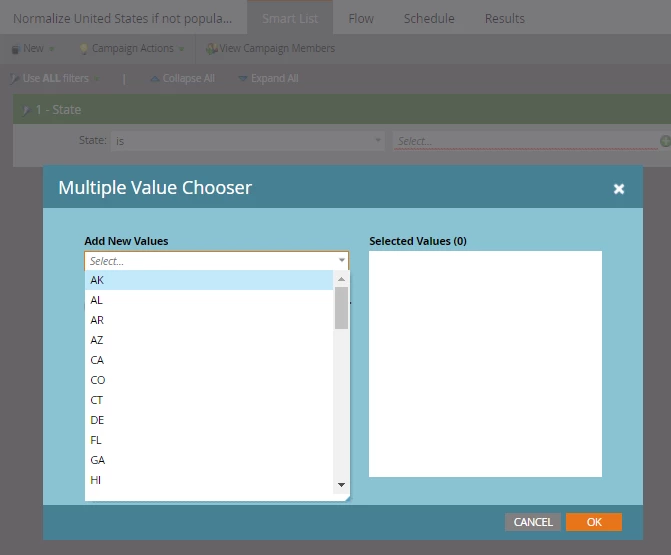
I am not sure if we have the ability to change the picklist or if it is dependent on the data in SFDC. We recently moved State/Province from 2 letter abbreviation to full name. It is still showing as the 2 letter abbreviation in our filter and would would prefer it be changed to the long form. I am building out batches to normalize the data but ultimately we would like to values to show what is now true.
This post is no longer active and is closed to new replies. Need help? Start a new post to ask your question.
Best answer by Josh_Hill13

Several issues

  • Marketo Forms must be updated to Display and Enter the correct values. Easy enough.
  • Existing Data - what you show there is what Marketo can see. It will not sure the full State name until the data itself reflects that. So you must run your batches.
    • Alternatively, you can try
      • SFDC data loader changes which may be more precise
      • Upload a list to Marketo with the new values such that Column A=Email Address and Column B=State
        • State must be unblocked from changes.
      • Smart Campaign data changer - yes, you can do this. Might be a bit slower. Be real careful.

1 reply

Josh_Hill13
Josh_Hill13Accepted solution
New Participant
July 28, 2017

Several issues

  • Marketo Forms must be updated to Display and Enter the correct values. Easy enough.
  • Existing Data - what you show there is what Marketo can see. It will not sure the full State name until the data itself reflects that. So you must run your batches.
    • Alternatively, you can try
      • SFDC data loader changes which may be more precise
      • Upload a list to Marketo with the new values such that Column A=Email Address and Column B=State
        • State must be unblocked from changes.
      • Smart Campaign data changer - yes, you can do this. Might be a bit slower. Be real careful.
Dan_Stevens_
New Participant
July 28, 2017

In addition to what Josh said, to update your forms, you need to first delete the field from each form and then re-add the field back in.  The new values will now reflect what's in SFDC (as long as the fields are mapped to one another).

Alternatively, you can leave the field in place and manually update the values.  But that introduces the risk of errors.  Best to grab the exact field values from CRM.