Changing only part of a data value | Community
Skip to main content
Stefan_Gassner
New Participant
February 21, 2019
Solved

Changing only part of a data value

  • February 21, 2019
  • 1 reply
  • 1542 views

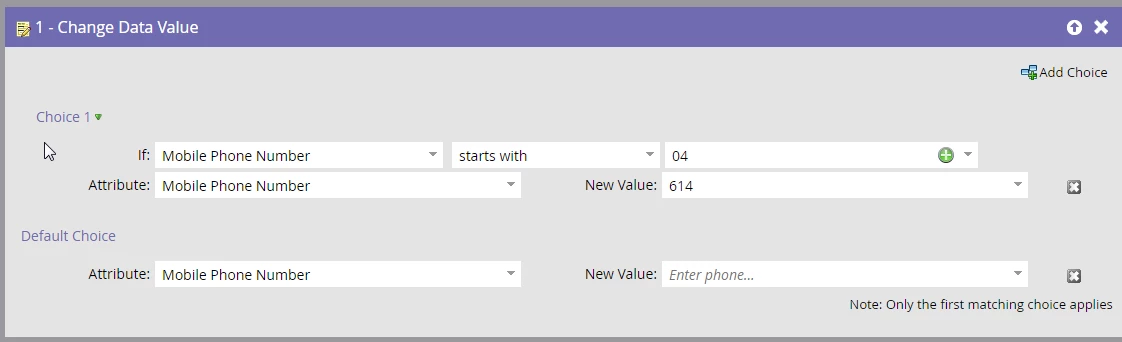
I'm trying to standardize my Mobile Number data using a smart Campaign as one of my webhooks won't allow for different formats for some reason.

Is there a way to only remove 1 or 2 digits of a value using the change data value flow step?

This is what I've got at the moment but it takes away the whole number.
This post is no longer active and is closed to new replies. Need help? Start a new post to ask your question.
Best answer by SanfordWhiteman

No can do with a Flow step. But have you seen my post on Calling the Twilio Lookup API as a Marketo webhook​ to perform phone number fixup? Format-only calls to the Twilio API are free. Presumably the other endpoint you're calling, if you're passing the {{lead.Mobile Phone}} expects the standard libphonenumber format returned by Twilio.

If that doesn't work you'd need a(nother) custom webhook to massage the data.

1 reply

SanfordWhiteman
SanfordWhitemanAccepted solution
New Participant
February 21, 2019

No can do with a Flow step. But have you seen my post on Calling the Twilio Lookup API as a Marketo webhook​ to perform phone number fixup? Format-only calls to the Twilio API are free. Presumably the other endpoint you're calling, if you're passing the {{lead.Mobile Phone}} expects the standard libphonenumber format returned by Twilio.

If that doesn't work you'd need a(nother) custom webhook to massage the data.