Choosing the Right List Import Approach
There are five main ways a new lead can be created in Marketo:
- Manually in the lead database
- Through list import
- Through form fill-out
- Through creation in CRM as a lead or contact
- Via the API
Two of these methods automatically dedupe on email address: list imports and form fill-outs. There are several pieces of Marketo functionality that work better when you do not have duplicates. As such, we recommend that whenever possible, new records from marketing are created in Marketo via list import or form fill. This also allows for better tracking on the acquisition of new leads and reporting on marketing-sourced or sales-sourced leads. Here's a table showing the recommended method for entering data based on its source:
Lead Source | Recommended Entry Point into Marketo/CRM |
Marketing event | Via import into Members tab of the Event Program in Marketo |
List purchase | Via import into Members tab of the List Purchase program in Marketo |
Website | Via form fill-out in Marketo or on your website, but posted into Marketo via API post |
Sales activities – small quantities | Via manual creation in CRM |
Sales activities – larger quantities | Via import into CRM by a user who understands how to do it properly OR via import into Marketo into a program dedicated for CRM leads (to ensure that these are accurately attributed to sales and not marketing) |
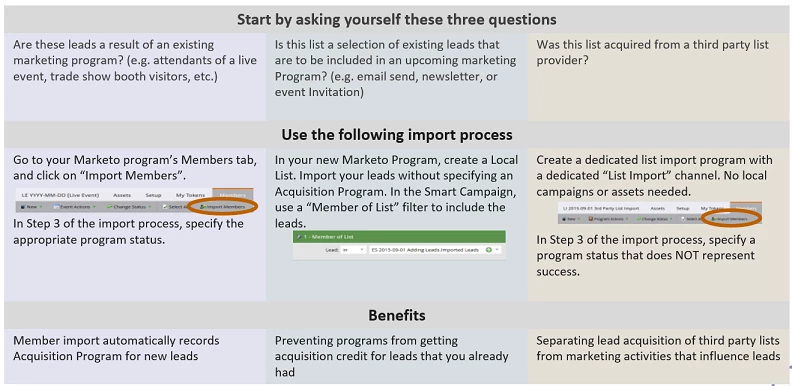
Whenever possible, you should import directly into the program using the members tab within the program. When you import into the members tab, the program status will be defined as part of the list import. This process also automatically assigns the acquisition program for any new leads to that program. However, when you import directly into the program, rather than into a static list, all members must be given the same program status. If, for example, you have a list of event attendees and no-shows, you should split these into two separate .csv files and import the attendees and no-shows separately.
When you import into the program and not into the members tab, you will need to set program membership and acquisition program for all of the leads separately. Generally, this is done either manually via a Change Data Value flow step or through a smart campaign based on membership of a specific static list.
Importing into a static list instead of a program should only be used for leads that were not acquired through a marketing activity, such as data that already exists in your database, which you just want to add to a static list.
One of our other consultants created this image, which I think is a great summary: