Cloning form with custom CSS | Community
Skip to main content
Danielle_Davis1
New Participant
December 22, 2022
Solved

Cloning form with custom CSS

  • December 22, 2022
  • 2 replies
  • 2927 views

Hopefully I'm posting this in the right place...

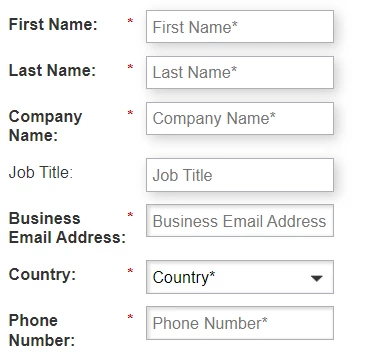
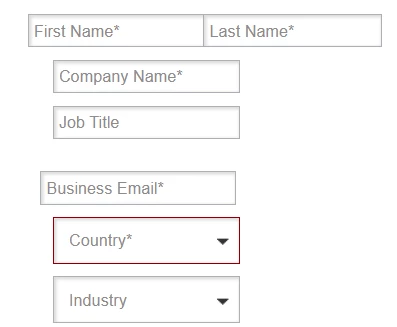
I cloned a form that has custom CSS. It appears the custom CSS does not get cloned, so I copied it from my original form to the form I cloned. However, the forms are still displaying differently. The main issue is that the field labels are showing up twice in my new form, but I'd like them to display only within the field, as they do on my original form.

I do not know enough to edit CSS on my own, which is why I was cloning a form that already had the custom CSS I wanted to use.

Does anyone know why copying the custom CSS over wouldn't have the form display the same way?

Thanks in advance for any feedback.

-Danielle

This post is no longer active and is closed to new replies. Need help? Start a new post to ask your question.
Best answer by SanfordWhiteman

The Custom CSS should be cloned as well — although there have been bugs in this area in the past.


In any case, it’s impossible to know for sure without seeing the forms live (like @vinay_kumar said) but it may also be that the Custom CSS was specifically tailored for the original form ID. For example, I see stuff like this in lots of Custom CSS:

#mktoForm_1234 input { border: 2px solid red; }


This selector will only apply to the original form ID, by definition. This is both good and bad.


  • Good: The styles you apply will never accidentally “leak” into other Marketo forms on the same page.
  • Bad: If you clone the form, intending to use the clone in exactly the same context, the styles won’t apply.
  • Also not good: Since the styles aren’t applied but are otherwise harmless, they tend to linger around forever because no one knows whether they’re necessary or not!

To make things more future-proof, it’s better to tag your <form> tag with a semantically solid name that can be used regardless of whether the ID changes:

<form id="mktoForm_1234" data-mktoform-name="Contact Us"></form>


Then your selectors use that:

[data-mktoform-name="Contact Us"] input { border: 2px solid red; }


Unfortunately, you can’t automatically pick up the Form Name from Marketing Activities/Design Studio. But this may be a net positive, since that’s a private value that may not be meant for outside consumption. (Sidebar: this is why I don’t like using {{program.name}} or {{campaign.name}} in places that the public can see.)

2 replies

SanfordWhiteman
SanfordWhitemanAccepted solution
New Participant
December 22, 2022

The Custom CSS should be cloned as well — although there have been bugs in this area in the past.


In any case, it’s impossible to know for sure without seeing the forms live (like @vinay_kumar said) but it may also be that the Custom CSS was specifically tailored for the original form ID. For example, I see stuff like this in lots of Custom CSS:

#mktoForm_1234 input { border: 2px solid red; }


This selector will only apply to the original form ID, by definition. This is both good and bad.


  • Good: The styles you apply will never accidentally “leak” into other Marketo forms on the same page.
  • Bad: If you clone the form, intending to use the clone in exactly the same context, the styles won’t apply.
  • Also not good: Since the styles aren’t applied but are otherwise harmless, they tend to linger around forever because no one knows whether they’re necessary or not!

To make things more future-proof, it’s better to tag your <form> tag with a semantically solid name that can be used regardless of whether the ID changes:

<form id="mktoForm_1234" data-mktoform-name="Contact Us"></form>


Then your selectors use that:

[data-mktoform-name="Contact Us"] input { border: 2px solid red; }


Unfortunately, you can’t automatically pick up the Form Name from Marketing Activities/Design Studio. But this may be a net positive, since that’s a private value that may not be meant for outside consumption. (Sidebar: this is why I don’t like using {{program.name}} or {{campaign.name}} in places that the public can see.)
Danielle_Davis1
New Participant
December 22, 2022

Thank you, Sanford! I scanned the CSS and found multiple places where the form code was referenced, so this explains it.

I appreciate the thorough explanation!

-Danielle

SanfordWhiteman
New Participant
December 22, 2022

Great! I’m going to publish a blog post on this because I think it’s best practice to avoid using the ID (even if you use the custom data-mktoform-name attribute instead you can make it unique if you want, but you can never make the ID non-unique).

Vinay_Kumar
Community Manager
December 22, 2022

Hi @danielle_davis1,


You can try hiding the label element using the following CSS:

.mktoLabel {
display: hidden !important;
}


If the above-mentioned CSS won't work then there can be some other reasons for custom CSS not working as expected. So, to help more on the issue I would suggest sharing a test LP with the form. 


Thanks