Combine (concatenate) multiple fields into one field | Community
Skip to main content
New Participant
November 16, 2023
Solved

Combine (concatenate) multiple fields into one field

  • November 16, 2023
  • 2 replies
  • 2216 views

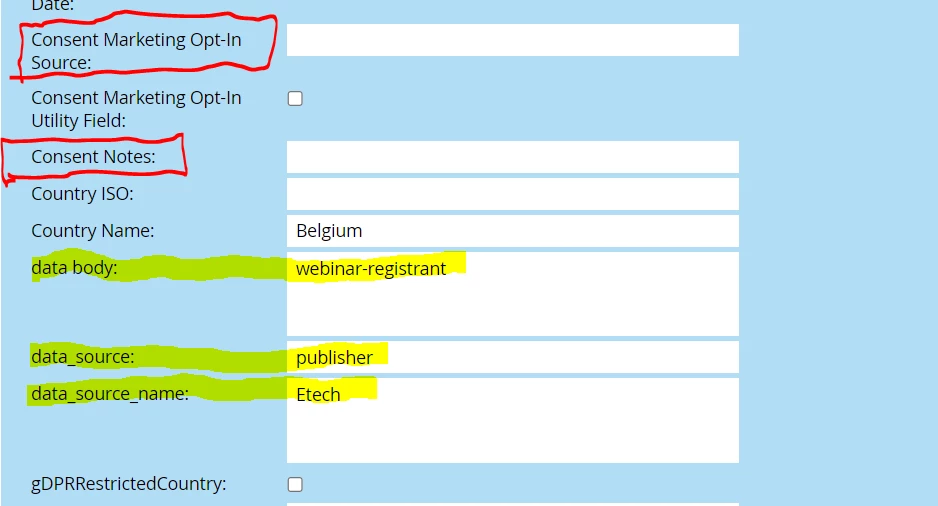
Is it possible to combine (concatenate) multiple fields into one field in Marketo. I am trying to combine our "data_source,-data_source_name-data_body fields into our "Consent Notes" field without having to concatenate the fields in an excel before uploading. On the attached image, I am trying to combine (concatenate) the three fields in yellow into one field combined in the "Consent Notes" field. 


Any suggestions or advice is always greatly appreciated.

Best,

This post is no longer active and is closed to new replies. Need help? Start a new post to ask your question.
Best answer by Darshil_Shah1

To Sandy's point, you can concatenate field values together using the lead tokens in the following manner via the Change Data Value flow step in the campaign's flow. Make sure you set the required type of campaign, and its smart list is able to qualify the right set of people you want to concatenate the data for.

Furthermore, I totally agree with Sanyd's recommendation regarding using the JSON structure for concatenating data! Choosing a standardized format like JSON over a more custom or fragile structure offers numerous advantages in terms of readability, interoperability, flexibility, and error handling. However, the choice between the two would depend on the specific use case, the nature of the data being transmitted, and the compatibility with existing systems or platforms. Overall, using a standardized format increases the robustness and compatibility of data exchange between different applications or systems.

2 replies

Darshil_Shah1
Darshil_Shah1Accepted solution
Community Manager
November 16, 2023

To Sandy's point, you can concatenate field values together using the lead tokens in the following manner via the Change Data Value flow step in the campaign's flow. Make sure you set the required type of campaign, and its smart list is able to qualify the right set of people you want to concatenate the data for.

Furthermore, I totally agree with Sanyd's recommendation regarding using the JSON structure for concatenating data! Choosing a standardized format like JSON over a more custom or fragile structure offers numerous advantages in terms of readability, interoperability, flexibility, and error handling. However, the choice between the two would depend on the specific use case, the nature of the data being transmitted, and the compatibility with existing systems or platforms. Overall, using a standardized format increases the robustness and compatibility of data exchange between different applications or systems.

New Participant
November 17, 2023

Thanks everyone. Your suggestion worked.

SanfordWhiteman
New Participant
November 16, 2023

Yes. You can use a Change Data Value flow step and include multiple {{lead.tokens}} in the new value box.


As a side note, this “structured value format” seems pretty fragile. I recommend a standard format that can be parsed by external apps, like a JSON array or URL-encoded (i.e. like a query string).
