Contact Report Opened Multiple Emails | Community
Skip to main content
New Participant
May 13, 2020
Solved

Contact Report Opened Multiple Emails

  • May 13, 2020
  • 1 reply
  • 1662 views

I'm trying to create a report (e.g. smart list) identifying all the individual contacts who opened ALL of 6 emails sent. I used the below formula:
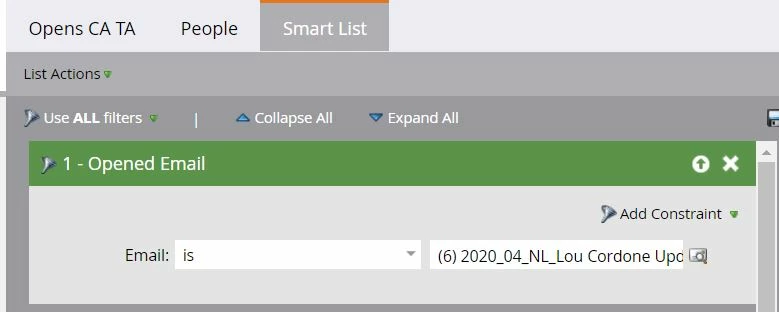
 

It seems that this smart list is actually pulling contacts who opened ANY of the 6 emails we sent. 

This post is no longer active and is closed to new replies. Need help? Start a new post to ask your question.
Best answer by Chris_Wilcox

You just need to write 6 separate filters for "opened email" and put 1 in each filter. Then make sure your filter rules is set to "All." 


Basically, when you add multiple options inside a smartlist filter like that, they are always used as a "OR." If you want to force it to be all, you have to add a separate filter for each occurrence.

1 reply

Chris_Wilcox
Chris_WilcoxAccepted solution
New Participant
May 13, 2020

You just need to write 6 separate filters for "opened email" and put 1 in each filter. Then make sure your filter rules is set to "All." 


Basically, when you add multiple options inside a smartlist filter like that, they are always used as a "OR." If you want to force it to be all, you have to add a separate filter for each occurrence.