Creating a report for A/B test in my engagement program | Community
Skip to main content
April 26, 2016
Solved

Creating a report for A/B test in my engagement program

  • April 26, 2016
  • 1 reply
  • 1580 views

Hello everyone!

I am trying to create a report to view how my A/B test is performing and am having issues pulling the A/B test into my report.

When I try to add the stream that contains the A/B test, it is only pulling in the original email not my challenger.

Is there an easy fix to add this into my report so I can choose the correct winner?

AnnaBelle

This post is no longer active and is closed to new replies. Need help? Start a new post to ask your question.
Best answer by Dory_Viscoglio

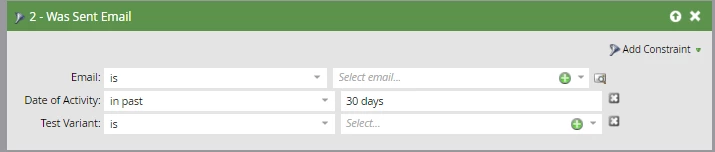
Hi AnnaBelle, there's a Champion/Challenger dashboard that you can review to see which of your emails is performing better. If you're using smart lists for any of your reporting, you can also constrain your results by test variants:

1 reply

Dory_Viscoglio
Dory_ViscoglioAccepted solution
New Participant
April 26, 2016

Hi AnnaBelle, there's a Champion/Challenger dashboard that you can review to see which of your emails is performing better. If you're using smart lists for any of your reporting, you can also constrain your results by test variants:

April 26, 2016

Thanks Dory!

I would love to be able to have more reporting on my end. We always report on CTR versus CTOR, when I create the smart list, it doesn't give me any of the email information, just the recipients.

Am I missing something on the dashboard that will show me an overall view of exactly how many emails were sent one version and how many received the test email?

All I am seeing is how many clicks I have gotten in a week, versus my test overall.

AnnaBelle