Creating Dropdowns in Marketo Form | Community
Skip to main content
November 18, 2015
Solved

Creating Dropdowns in Marketo Form

  • November 18, 2015
  • 2 replies
  • 5465 views

Hi All,

I created a custom field of Type:String in Field Management. Now in a Marketo form,  I want this field to be as a dropdown. However, I am unable to find any option to do the same.

Can you guys help me out as to how can I set that field as a dropdown and fill that dropdown with some pre set values ?

Awaiting quick responses !

Thanks a lot !

Prabash Rath

This post is no longer active and is closed to new replies. Need help? Start a new post to ask your question.
Best answer by Stijn_Heijthuij

Try this:

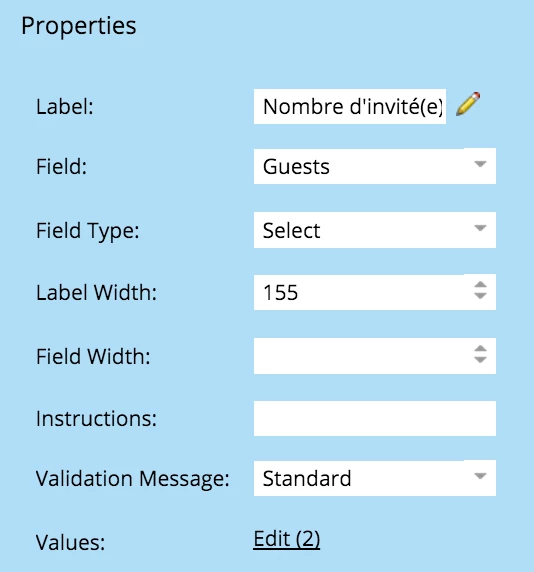
  1. Field Type should be Select
  2. Values should be edited to the options you want to display

2 replies

Stijn_Heijthuij
Stijn_HeijthuijAccepted solution
New Participant
November 18, 2015

Try this:

  1. Field Type should be Select
  2. Values should be edited to the options you want to display

November 18, 2015

Hey Stijin,

Thanks a lot ! its working great

Also, we want this dropdown field to be hidden. Is there any option we can do that ? As in a field type in forms that is both 'Select' and 'Hidden' ?

SanfordWhiteman
New Participant
November 18, 2015

I cannot imagine, for the life of me, how "Select" and "Hidden" could be simultaneously true.

SanfordWhiteman
New Participant
November 18, 2015

November 18, 2015

Hi Sanford,

That's great, thanks a lot !

Now, where can I go and populate that dropdown with some string values ? As in, if my field is country, on clicking the dropdown; some pre filled countries like India, China etc. are present for the use to select from ?

Thanks !