
Currency Formatting in Email Scripts | Community
Skip to main content
Monica_Koran
New Participant
March 27, 2017
Solved

Currency Formatting in Email Scripts

  • March 27, 2017
  • 4 replies
  • 5845 views

I am trying to pull in a dollar AND cents amount into an email via a token. I have attempted to use the following email script to format the token and it is not working.  I feel as though I am missing something minor.  Thank you for any help!

## First, covert the variable to currency format

#set($total = $number.currency(${lead.your_field_here})) ##our code from before, e.g., $121,237.10

#set($stringLength = $total.length() - 3) ##get the total string length and calculate what we want to keep, e.g., 8 --note the specific spacing between the commands here! screwing up the syntax will crash it (e.g. if you remove the space)

#set($totalb = $total.substring(0,$stringLength)) ##takes the sub string of just the first 3 characters, e.g., $121,237

## Then, for the email output

${totalb}
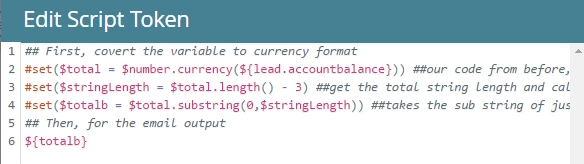
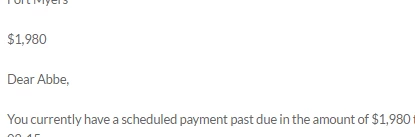
Its showing as $1,980 not $1980.64 as it should.
Thanks again for any insight!

This post is no longer active and is closed to new replies. Need help? Start a new post to ask your question.
Best answer by Monica_Koran

This is the full script I used to solve for this problem.  Thanks for your help!

## First, covert the variable to currency format

#set($total = $number.currency(${lead.accountBalance})) ##our code from before, e.g., $121,237.10

#set($stringLength = $total.length() - 0) ##get the total string length and calculate what we want to keep, e.g., 8 --note the specific spacing between the commands here! screwing up the syntax will crash it (e.g. if you remove the space)

#set($totalb = $total.substring(0,$stringLength)) ##takes the sub string of just the first 3 characters, e.g., $121,237

## Then, for the email output

${totalb}

4 replies

SanfordWhiteman
New Participant
April 6, 2017

OK but that's not best practice for VTL. The minus sign, specifically, is a really bad idea.

Monica_Koran
Monica_KoranAuthorAccepted solution
New Participant
April 6, 2017

This is the full script I used to solve for this problem.  Thanks for your help!

## First, covert the variable to currency format

#set($total = $number.currency(${lead.accountBalance})) ##our code from before, e.g., $121,237.10

#set($stringLength = $total.length() - 0) ##get the total string length and calculate what we want to keep, e.g., 8 --note the specific spacing between the commands here! screwing up the syntax will crash it (e.g. if you remove the space)

#set($totalb = $total.substring(0,$stringLength)) ##takes the sub string of just the first 3 characters, e.g., $121,237

## Then, for the email output

${totalb}

SanfordWhiteman
New Participant
March 28, 2017
Its showing as $1,980 not $1980.64 as it should.

But your code explicitly truncates the decimal point and the two decimal digits, effectively rounding down (though without using any numeric logic, which is not advisable).

So I don't understand what you mean by "should" here. What is the raw string value that you're storing in the field, and how do you want the output in an email to differ from the raw form?

#set($stringLength = $total.length() - 3) ##get the total string length and calculate what we want to keep, e.g., 8 --note the specific spacing between the commands here! screwing up the syntax will crash it (e.g. if you remove the space)

Note the subtraction operator - isn't reliably supported in Velocity (because of the fragile syntax that's noted in your code comments).  $math.sub($total.length(),3) or $math.add($total.length(),3) do not care about whitespace. Regardless, the correct way to truncate a numeric string is to take the floor:

$math.floor($number.toNumber($lead.amount)))

But you need to be clear about why your code truncates the number (instead of the traditional rounding up) in the first place. I don't really understand your question because you seem to want the code to do the opposite of what it explicitly tries to do.

If you don't want to truncate but instead want the rounded-up currency format only without a comma, do:

$number.format( "$${esc.h}.${esc.h}${esc.h}", $lead.amount )

Monica_Koran
New Participant
March 28, 2017

So I don't understand what you mean by "should" here. What is the raw string value that you're storing in the field, and how do you want the output in an email to differ from the raw form? 

     The Raw String value that I want in the output of the email is $1980.64.  As I mentioned, on the lead record, it shows $1980.64 in the field however the email script token brings in a number that is missing the "cents". 

Basically, I would like code that simply brings in the value in currency format with no options for rounding up or down

If there is code available for that, that would be great!!

Thank you so much for guidance!

SanfordWhiteman
New Participant
March 28, 2017

I provided that code above.

Realize that currency format always rounds to 2 decimal places (this is true everywhere that currency is displayed, not just here in Mkto/VTL/Java). Of course if you have only 2 to begin with, that's effectively the same as "not rounding." If you had 3 digits or more you'd see the rounding.

New Participant
March 27, 2017

Hi Monica,

I haven't dug into this too thoroughly but you might try parsing the original value (set a dollar var and a cent var) and piece them back together for the total.

Hope that works!

Rachel