Custom CSS | Community
Skip to main content
Megan_Reardon1
New Participant
July 1, 2020
Question

Custom CSS

  • July 1, 2020
  • 1 reply
  • 2850 views

Hi Marketo Users!

I'm trying to unbold a field on a form. "To unsubscribe to updates..." 
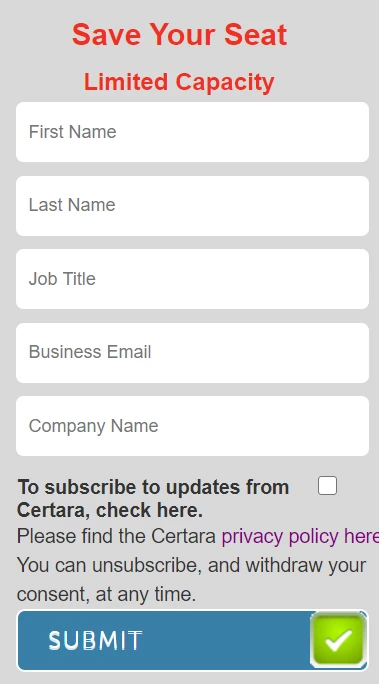
 

I have custom css in to make the checkbox appear to the right 

/* Add your custom CSS below */ .mktoForm label[for="Opt Out"] { float:left!normal; margin-left: 10px!normal; width:316px!normal; }


I thought changing the text in the code to normal instead of important would fix, but not the case. 


Any ideas? 


1 reply

SanfordWhiteman
New Participant
July 1, 2020

Hmm, no, !normal isn't a thing. 🙂


I also have some doubt that the id of the field is actually Opt Out (with the space).  What's your URL?

Megan_Reardon1
New Participant
July 1, 2020

Thanks, Sanford. No coding skills at all here - that was a total guess, which was a huge fail! Thanks. 


So we're  changing the language to Opt-in rather than opt-out so I went ahead and created a new field (OptIn)


Can you point me in finding the ID of the field? 


Also, what sort of URl can i provide you with? the test landing page? lp.certara.com/LP-TestNewForm.html


Thanks for the help. It's very much appreciated. 


Megan_Reardon1
New Participant
July 1, 2020

I'm ultimately trying to unbold that text and have the checkbox directly to the right or left of the text.