Custom Objects in Marketo - Part 2 - REST API | Community
Skip to main content
John_M
Employee
October 9, 2015

Custom Objects in Marketo - Part 2 - REST API

  • October 9, 2015
  • 7 replies
  • 7757 views

Next up, the REST API, which is, relatively speaking, a new thing. The custom object parts of the REST API are documented on the developer blog on their own separate page, and in my opinion it makes sense to monitor that page for changes so you know when the API has new features added.

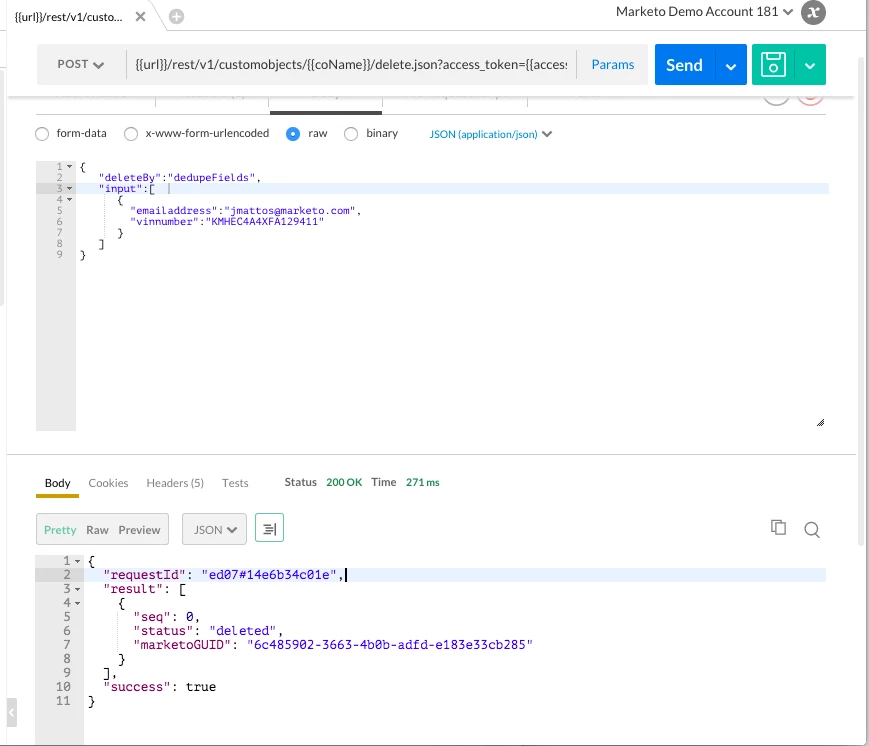
For the purposes of this, I'll be referencing the Automobile object that I created in part 1 of this series, and I'll be using Postman to make my REST calls. (note you can read about use of the SOAP api in Part III of the series) Here's what it looks like:
Create/Update Custom Objects

Request

491-XYZ-299.mktorest.com/rest/v1/customobjects/automobile_c.json?access_token=3471-4804-afd9-e9925fd632f9:sj

jSON Payload

{

  "action": "createOrUpdate",

  "dedupeBy": "dedupeFields",

  "input": [

    {

      "bodystyle": "Coupe",

      "color": "Silver",

      "make": "Hyundai",

      "model": "Sonata Hybrid",

      "year": "2015",

      "vinnumber": "KMHEC4A4XFA129411",

      "emailaddress": "jmattos@marketo.com"

    }

  ]

}

Response

{

  "requestId": "8ca7#14e6ad1cc70",

  "result": [

    {

      "seq": 0,

      "status": "created",

      "marketoGUID": "98f652e8-e8f0-47b1-a1f7-18dc005007c3"

    }

  ],

  "success": true

}

Delete Custom Objects

Request

491-XYZ-299.mktorest.com/rest/v1/customobjects/automobile_c/delete.json??access_token=3471-4804-afd9-e9925fd632f9:sj

jSON Payload

{

   "deleteBy":"dedupeFields",

   "input":[

      {

        "emailaddress":"jmattos@marketo.com",

        "vinnumber":"KMHEC4A4XFA129411"

      }

   ]

}

Response

{

  "requestId": "ed07#14e6b34c01e",

  "result": [

    {

      "seq": 0,

      "status": "deleted",

      "marketoGUID": "6c485902-3663-4b0b-adfd-e183e33cb285"

    }

  ],

  "success": true

}

So there you have it. a Sample REST call to Create a custom object, and one to Delete a custom object. The other calls are really quite similar.

7 replies

New Participant
October 11, 2021

To bad I can't downvote the comments that hurt my heart @jo_pitts1 .

@sanfordwhiteman This ties in to whatever previous questions I asked last week about file sizing.  
In the example above, OP only provides sending 1 object to Marketo each time.  I had a file with 32524 custom objects that had to be updated, but in the example, there was only 1 being uploaded.

But the problem was solved when we realized Adobe is 10,000,000 bytes max, not 1024*1024*10 bytes max, so we could just use a file uploader, instead of a custom API call with each line like above

Jo_Pitts1
Community Manager
October 5, 2021

@sanfordwhiteman and @darthzeran and why would you want to?

Is this the weirdest troll in the world? 

SanfordWhiteman
New Participant
October 5, 2021

What if I want to upload a file with 32524 fields in csv format?

Not sure I understand. You can’t have 32524 fields on a Custom Object record.

New Participant
September 28, 2021

What if I want to upload a file with 32524 fields in csv format?

January 30, 2018

Can you add syntax for GET custom object?  Newbee looking for starting code.

John_M
John_MAuthor
Employee
March 15, 2017

Thanks Kevin Bickelmann​ !!! I updated that link.

November 19, 2015

Great post!

BTW: you need to update your part III link above to: Custom Objects in Marketo - Part 3 - SOAP API