
Custom page template marks form field as required | Community
Skip to main content
Jessie_Johnson
New Participant
March 9, 2019
Solved

Custom page template marks form field as required

  • March 9, 2019
  • 4 replies
  • 4953 views

We have a very simple custom page template, and when creating a new page and choosing this, then adding an existing form, it consistently marks the "comment" field as required, even tho this form field is not required. This custom page template is attached. And note that this form was simply cloned from an existing form which DID have the comment field required.
This post is no longer active and is closed to new replies. Need help? Start a new post to ask your question.
Best answer by SanfordWhiteman

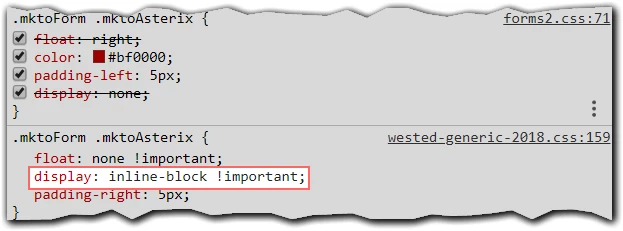
Yep, but it's not JS, just CSS. The <div> always exists in the DOM even for non-required fields. There's custom CSS unhiding it.

4 replies

SanfordWhiteman
New Participant
March 11, 2019

@Jessie Johnson please return to the thread and mark my answer as Correct. As you can see, the cause is in your custom CSS stylesheet, not Marketo.

Corey_Bethel
New Participant
March 11, 2019

The comments field only appears to be "required", but the form will submit without that field being populated. Also, the comments field is missing the "mktoRequired" class that would actually make it required. I'd say there is some custom JS that is adding the div with the "mktoAsterix" class, which is why it appears to be required.

Corey BethelConsultant | Etumos
SanfordWhiteman
SanfordWhitemanAccepted solution
New Participant
March 11, 2019

Yep, but it's not JS, just CSS. The <div> always exists in the DOM even for non-required fields. There's custom CSS unhiding it.

Jessie_Johnson
New Participant
March 12, 2019

Aha! I removed this, changed to float, and all is well again. Thank you all!

Amit_Jain
Community Manager
March 10, 2019

Agree with Sanford here.

Also check on the form if you have any custom JS code which is making all the fields on the form as "Required".

Jessie_Johnson
New Participant
March 11, 2019

None

SanfordWhiteman
New Participant
March 9, 2019

Not sure why you're attributing this to the template. Please show the form setup. Ensure that both the form and the LP with the form selected have been reapproved.

Jessie_Johnson
New Participant
March 11, 2019

Only when the form is embedded in this form does the last field appear as required.

SanfordWhiteman
New Participant
March 11, 2019

We need to see the entire form. Please provide the embed code. There's nothing on that template that does anything special.