Customizing Form Label Under Visibility Rules | Community
Skip to main content
New Participant
January 4, 2016
Solved

Customizing Form Label Under Visibility Rules

  • January 4, 2016
  • 2 replies
  • 4044 views

When the country field on our form is selected for either United States or Canada, the visibility rules are enabled to display another field for State or Province. All of our field labels are white and displayed on a dark blue background. However, because the label for state or province is displayed from the visibility rules window, it defaults to black font color. Can anyone provide any help or custom CSS that would change this font color to white? Thanks!

This post is no longer active and is closed to new replies. Need help? Start a new post to ask your question.
Best answer by Grant_Booth

Hi Jeff,

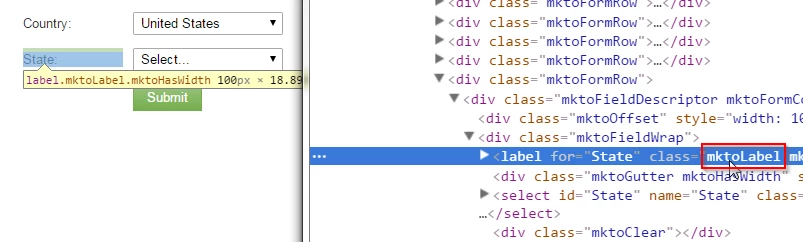
I'll generally use the Element Inspector to find a class or Id associated with the part of the form I'm looking for, then write some CSS to over-ride the default. Using the element inspector, I see that Marketo form labels have the class "mktoLabel":

Based on that, I came up with this:

<style>

.mktoLabel {

color:white;

}

</style>

Keep in mind that sets ALL the labels to white, not just the State label.

- Grant

2 replies

Grant_Booth
New Participant
January 4, 2016

Yes, the <style> tags would only be if you added HTML to the landing page instead of directly to the form CSS.

Grant_Booth
Grant_BoothAccepted solution
New Participant
January 4, 2016

Hi Jeff,

I'll generally use the Element Inspector to find a class or Id associated with the part of the form I'm looking for, then write some CSS to over-ride the default. Using the element inspector, I see that Marketo form labels have the class "mktoLabel":

Based on that, I came up with this:

<style>

.mktoLabel {

color:white;

}

</style>

Keep in mind that sets ALL the labels to white, not just the State label.

- Grant

Mark_Halliday1
New Participant
January 4, 2016

Jeff,

Using Grant's method you could add this to the custom CSS of the form: