Delete content section in email | Community
Skip to main content
November 26, 2015
Solved

Delete content section in email

  • November 26, 2015
  • 2 replies
  • 4415 views

Howdy!

I'm looking to remove an entire "editable" section from an email template — does anyone know how to do this?

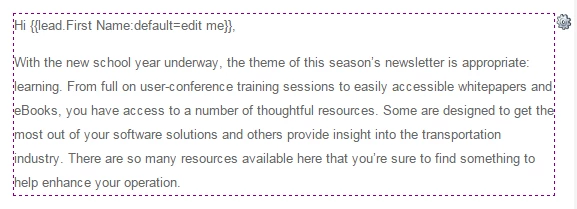
Below is an image of what I am referring to. You will see by the dotted line that the section is editable. But how do I remove not just the content within, but also the container itself?

Thanks!
This post is no longer active and is closed to new replies. Need help? Start a new post to ask your question.
Best answer by Grégoire_Miche2

Hi David,

Try editing the section in HTML mode and just add and HTML comment :

<!-- comment -->

instead of leaving it empty.

If it does not work, see your template designer, it's because the way the template is created sets a minimum height for this section.

-Greg

2 replies

New Participant
November 27, 2015

While we wait for Guided editor for emails, we can also create a blank snippet, and replace this section with the snippet. Deleting a section can break the layout at times.

Josh_Hill13
New Participant
November 26, 2015

Removing the content *may* collapse the section depending on the HTML that made it.

You can only remove an editable area at the Template level, but all dependent Emails with be thrown into Approved w/ Draft. If you need a different email format, please make a different template.

Also, vote up Guided Email Template Idea.

November 26, 2015

When we remove the content, the section never collapses. I wonder what is causing the section not to collapse.

It's not difficult to manually remove the HTML, it's just easier for end users to delete the section via the interface.

I wonder if there is a trick to coding the sections so they do collapse when emptied . . .

Grégoire_Miche2
Grégoire_Miche2Accepted solution
New Participant
November 26, 2015

Hi David,

Try editing the section in HTML mode and just add and HTML comment :

<!-- comment -->

instead of leaving it empty.

If it does not work, see your template designer, it's because the way the template is created sets a minimum height for this section.

-Greg
