Deleting/archiving Segmentation in database | Community
Skip to main content
January 8, 2018
Solved

Deleting/archiving Segmentation in database

  • January 8, 2018
  • 3 replies
  • 4848 views

Hi all! Kind of a 'dumb question' here, but was wondering how an email in Marketo could be using a database Segmentation? I'm trying to archive an old (now inaccurate) Segmentation and see in the 'Used By' tab that there are a number of emails that come up. However, when I click on the email, I can't seem to find how the email is using the Segmentation. Anyone know how to fix this?

This post is no longer active and is closed to new replies. Need help? Start a new post to ask your question.
Best answer by keithnyberg

Hey Jasmine,

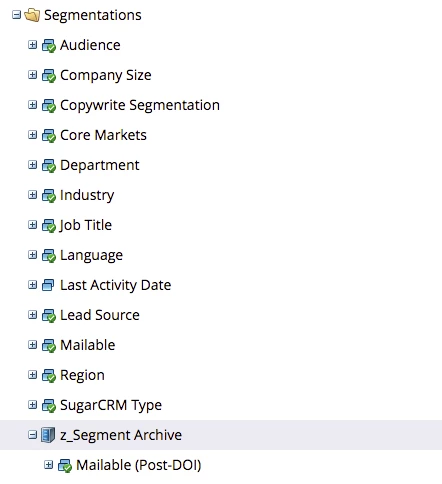
While JD's suggestion works, it requires you to find all assets using the segment and change them to all no longer be dynamic. A simpler solution is to create an archive folder in the segmentations folder named: z_Segment Archive. From there, right click on the folder and select "Convert to Archive". This will remove the segments from visibility in Marketo Smart Campaigns, Smart Lists, etc. without having to delete the segment and untangle all the local assets to hide it.

Example of Archive Folder                                                                             

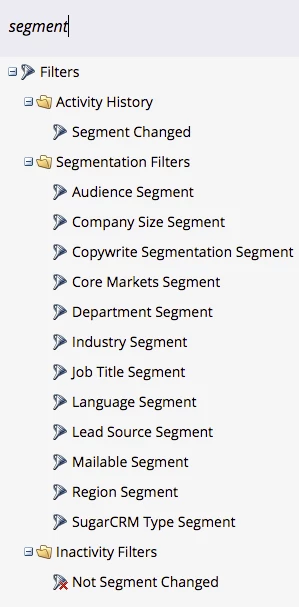
Segment Not Visible in Filters post Archive

Again, this hides everything without actually having to delete.

3 replies

January 9, 2018

This is really helpful - thanks, y'all!

keithnyberg
keithnybergAccepted solution
New Participant
January 9, 2018

Hey Jasmine,

While JD's suggestion works, it requires you to find all assets using the segment and change them to all no longer be dynamic. A simpler solution is to create an archive folder in the segmentations folder named: z_Segment Archive. From there, right click on the folder and select "Convert to Archive". This will remove the segments from visibility in Marketo Smart Campaigns, Smart Lists, etc. without having to delete the segment and untangle all the local assets to hide it.

Example of Archive Folder                                                                             

Segment Not Visible in Filters post Archive

Again, this hides everything without actually having to delete.

January 10, 2018

Hey Keith,

Would doing it this way free up our 25 allotted segmentations so that we can build more? 

Community Manager
January 10, 2018

That was going to be my question as well -- I would "hope" so -- but I think otherwise. Curious to know (if anyone is at that limit)...

Community Manager
January 8, 2018

Check the right-side of your email. Under the 'dynamic' tab:

If it doesn't look like this, then one of your sections of the email HAS dynamic content using segmentation.

Here's an example of one that DOES have dynamic sections: