Difference between "Comma Separated Values" and "Comma-Separated Values (Windows Excel 2007)" when exporting leads | Community
Skip to main content
pavel_plachky
New Participant
July 7, 2016
Solved

Difference between "Comma Separated Values" and "Comma-Separated Values (Windows Excel 2007)" when exporting leads

  • July 7, 2016
  • 1 reply
  • 1521 views

When exporting list of leads, there are several format options on the Export dialog box as follows:
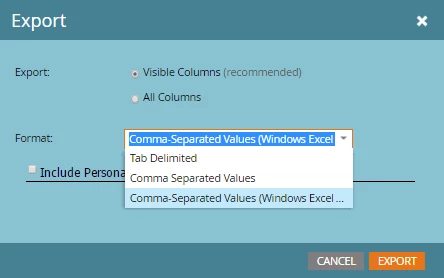
Does anybody know what is the difference between the different formats? I am mainly interested in the way special characters (and character sets) are handled in each format. The documentation at Export Leads to Excel from a List or Smart List - Marketo Docs - Product Docs  is not covering the topic at all.

This post is no longer active and is closed to new replies. Need help? Start a new post to ask your question.
Best answer by SydneyMulligan

I believe the Excel 2007 uses UTF-8 encoding, which may be better for special characters.

1 reply

SydneyMulligan
SydneyMulliganAccepted solution
New Participant
July 7, 2016

I believe the Excel 2007 uses UTF-8 encoding, which may be better for special characters.