Display Due Date Custom Token in proper format | Community
Skip to main content
New Participant
June 12, 2023
Solved

Display Due Date Custom Token in proper format

  • June 12, 2023
  • 2 replies
  • 4010 views

Greetings Community,

I feel like I am circling around the airport on this one, and I would love to bring this baby in for a landing.

Part 1:

We want to let our members know when their next payment is due. I have checked off the Product and NextDueDate checkboxes in the CCUAccount Custom object.
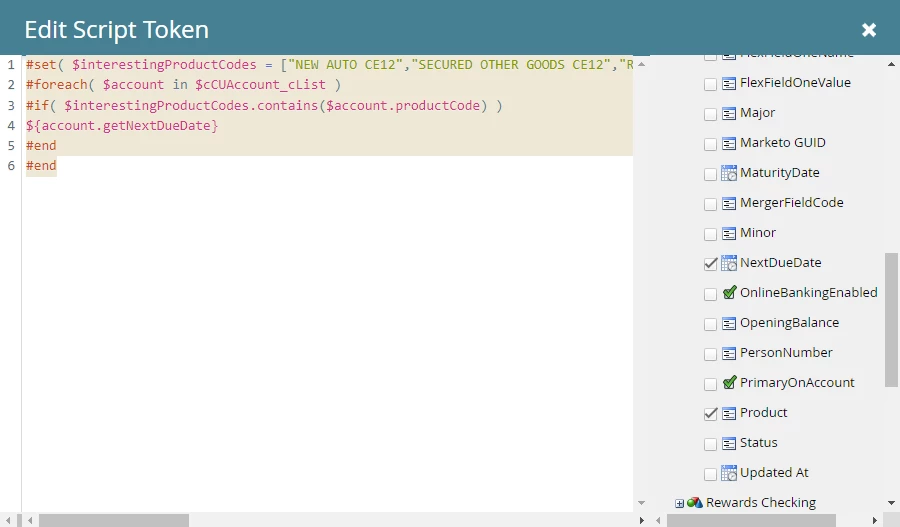

I put this code below into Velocity script which is supposed to show the Next Due Date based on their product code:

#set( $interestingProductCodes = ["NEW AUTO CE12","SECURED OTHER GOODS CE12","REC VEHICLE OE","SECURED OTHER GOODS OE","PCU USED VEHICLE","PCU USED VEHICLE JR MEETING","PCU NEW VEHICLE","NEW AUTO ALTERN IL","USED AUTO ALTERN IL","USED AUTO ALTERN WI","USED AUTO OE","NEW AUTO OE","MOTORCYCLE CE12","REC VEHICLE CE12"] ) #foreach( $account in $cCUAccount_cList ) #if( $interestingProductCodes.contains($account.productCode) ) ${account.getNextDueDate} #end #end

However, when I test the token in an email using contacts, nothing shows up. Is there any code I am missing here?

Part Two: The "NextDueDate" a date and time field displays the due date in this format: YYYY-MM-DDThh:mm:ssTZD. What code can I apply to the above to change it to show the date as MM-DD-YYYY? 

Thanks so much in advance.


This post is no longer active and is closed to new replies. Need help? Start a new post to ask your question.
Best answer by Darshil_Shah1

Hi Darshil,

Sorry for the delay.  Regarding your inquiry "What is the unformatted output of the nextDueDate field? Earlier you said it was 2010-05-07T15:41:32-05:00 , and we shared the code to process this input date format which isn't working for you, so could you please confirm the output of your original code (i.e., the one below)?"

#set( $interestingProduct = ["NEW AUTO CE12","SECURED OTHER GOODS CE12","REC VEHICLE OE","SECURED OTHER GOODS OE","PCU USED VEHICLE","PCU USED VEHICLE JR MEETING","PCU NEW VEHICLE","NEW AUTO ALTERN IL","USED AUTO ALTERN IL","USED AUTO ALTERN WI","USED AUTO OE","NEW AUTO OE","MOTORCYCLE CE12","REC VEHICLE CE12"] ) #foreach( $account in $cCUAccount_cList ) #if( $interestingProduct.contains($account.product) ) ${account.nextDueDate} #end #end

The output result is below:


Also, I updated line 12 per your instructions and it looks to be having the same issue.


I appreciate your continued assistance and patience. 🙂


Ahaa- you don't have the "T" in the unformatted nextDueDate output, you have a space instead! Could you try the below script:


#set( $defaultTimeZone = $date.getTimeZone().getTimeZone("America/New_York") ) #set( $defaultLocale = $date.getLocale() ) #set( $calNow = $date.getCalendar() ) #set( $ret = $calNow.setTimeZone($defaultTimeZone) ) #set( $calConst = $field.in($calNow) ) #set( $ISO8601DateOnly = "yyyy-MM-dd" ) #set( $ISO8601DateOnlyMonthFirst = "MM-dd-yyyy" ) #set( $ISO8601DateTime = "yyyy-MM-dd'T'HH:mm:ss" ) #set( $ISO8601DateTimeWithSpace = "yyyy-MM-dd HH:mm:ss" ) #set( $ISO8601DateTimeWithMillisUTC = "yyyy-MM-dd'T'HH:mm:ss.SSS'Z'" ) #set( $ISO8601DateTimeWithMillisTZ = "yyyy-MM-dd'T'HH:mm:ss.SSSZ" ) #set( $interestingProduct = ["NEW AUTO CE12","SECURED OTHER GOODS CE12","REC VEHICLE OE","SECURED OTHER GOODS OE","PCU USED VEHICLE","PCU USED VEHICLE JR MEETING","PCU NEW VEHICLE","NEW AUTO ALTERN IL","USED AUTO ALTERN IL","USED AUTO ALTERN WI","USED AUTO OE","NEW AUTO OE","MOTORCYCLE CE12","REC VEHICLE CE12"] ) #foreach( $account in $cCUAccount_cList ) #if( $interestingProduct.contains($account.product) ) #set( $nextDueDateFormatted = $convert.toCalendar( $convert.parseDate( $account.nextDueDate, $ISO8601DateTimeWithSpace, $defaultLocale, $defaultTimeZone ) )) ${date.format( $ISO8601DateOnlyMonthFirst, $nextDueDateFormatted, $defaultLocale, $defaultTimeZone )} #end #end


2 replies

Darshil_Shah1
Community Manager
June 13, 2023

You gotta show us the output of the CO list for the person record first to be able to troubleshoot(as Sandy says). That's the first step you gotta follow when the output isn't something that you hoped it'd have been. Additionally, do you have duplicate records in your database? It's worth mentioning that Preview By Person de-duplicate records by email address. This can lead to you seeing data for a different person record in the person profile page, and expecting a particular output, whereas the Email Preview running the script on a different person record altogether (this is one of the reasons why Preview By List is preferred instead). Re- your Part 2 question, you'd have to fomat the calender object to be able to display the output in the desired format. There are plenty of threads on the community already where we've discussed that.


SanfordWhiteman
New Participant
June 13, 2023

I put this code below into Velocity script which is supposed to show the Next Due Date based on their product code:

Hmm, how is it “based on” their product code? Do you mean “if their product code is in the list of interesting codes”? Always best to be explicit.


Is getNextDueDate the Velocity name of the field whose friendly name is NextDueDate? How have you determined that Velocity name? More important what does the whole $cCUAccount_cList list look like when you output it (this is an absolutely key part of troubleshooting)?

LCENTENOAuthor
New Participant
June 13, 2023

Hi @sanfordwhiteman , yes I am referring to if their product code is in the interesting codes list that I provided. Yes, NextDueDate is the field name within the CCUAccount CO.  

As far as your last question "More important what does the whole $cCUAccount_cList list look like when you output it (this is an absolutely key part of troubleshooting)?" I am not sure what you are asking.

Darshil_Shah1
Community Manager
June 13, 2023

What output do you get when you just add ${cCUAccount_cList} in your email script token? This will display the list of all the custom object records associated with that person record.

